Best Gaming Motherboards in 2026 (AMD & Intel Buying Guide)
Quick answer: For most builders, the ASRock X870E Taichi (AMD) and Gigabyte Z890 Aorus Pro Ice (Intel) offer the strongest balance of VRM quality, storage, and connectivity for the money. Budget builders should look at the Gigabyte B650 Aorus Elite AX or ASRock Z790 Steel Legend, both around $230.
A motherboard doesn’t add frames to your game, but the wrong one will quietly take them away. It sets your CPU’s power ceiling, decides whether your graphics card actually gets full PCIe bandwidth, and determines whether that PCIe 5.0 SSD you paid extra for runs at full speed or throttles under an undersized heatsink.
Right now, both major platforms have mature, deep lineups. AMD’s AM5 socket spans the X870E, X870, B850, and B650 chipsets, covering everything from $130 budget boards to $1,200 flagships. Intel’s Z890 and B860 run on the newer LGA1851 socket, while the older LGA1700-based Z790 remains a legitimate, budget-friendly option for anyone building around a 12th, 13th, or 14th Gen Core CPU.
To put this guide together, we cross-referenced manufacturer spec sheets and pricing against independent lab reviews and testing from outlets including Tom’s Hardware, TechPowerUp, Tweaktown, PC Gamer, Club386, and Wccftech, then checked current street pricing across major retailers.
Below you’ll find our top picks by category, in-depth reviews of the twelve best options on the market, and a full breakdown of what actually matters when you’re choosing a motherboard versus what’s just marketing on the box.
Quick Picks (Comparison Table)
If you’re in a hurry, here’s the short version. Each pick links to a full review further down the page.
| Category | Motherboard | Why It Wins |
|---|---|---|
| Best Overall | ASUS ROG Crosshair X870E Glacial | No-compromise flagship with seven M.2 slots, dual 10GbE, and a 24+2+2 power stage VRM |
| Best Budget | Gigabyte B650 Aorus Elite AX | Full AM5 feature set, solid VRM, and DDR5 support for around $230 |
| Best AMD | ASRock X870E Taichi | Flagship-grade VRM and I/O at $150–$300 less than the true flagships |
| Best Intel | Gigabyte Z890 Aorus Pro Ice | Five M.2 slots, dual Thunderbolt 4, and a 16+1+2 VRM for a reasonable price |
| Best DDR5 Performance | MSI MEG Z890 Godlike | CUDIMM support past 9,200 MT/s with the most permissive memory controller tuning we tested |
| Best Mini-ITX | ASUS ROG Strix B850-I Gaming WiFi | The only B850 ITX board with dual PCIe 5.0 M.2 sockets |
| Best ATX | MSI MAG X870E Tomahawk WiFi | X870E features — USB4, WiFi 7, dual Gen5 M.2 — for around $300 |
| Best Creator Motherboard | ASRock X870 Taichi Creator | 10GbE, dual PCIe 5.0 slots, and generous spacing for expansion cards |
Best Gaming Motherboards of 2026
We picked these twelve boards because they represent the best value, performance, or feature set at their respective price points and chipset tiers — not because they’re simply the most expensive options available. Pricing below reflects typical street pricing at the time of writing and will shift with retailer promotions.
1. ASUS ROG Crosshair X870E Glacial
The Crosshair X870E Glacial is ASUS’s answer to “what if a motherboard had no compromises at all.” It’s an E-ATX flagship built around a 24+2+2 power stage VRM rated for 110A per phase, and it’s designed to sit at the top of a white-themed, no-budget-limit AM5 build.
What stands out isn’t just the power delivery. ASUS crammed in seven total M.2 slots (three running full PCIe 5.0 x4 bandwidth), dual 10GbE Ethernet ports, dual USB4, and a 5-inch color LCD panel for real-time system monitoring built directly into the board.
Specifications
| Spec | Detail |
|---|---|
| Socket / Chipset | AM5 / X870E |
| Form Factor | E-ATX |
| VRM | 24+2+2 phases, 110A power stages |
| Memory | 4x DDR5, up to 256GB, DDR5-9000+ (OC) |
| Storage | 7x M.2 (3x native PCIe 5.0 x4), 4x SATA III |
| Networking | Dual 10GbE, WiFi 7 (MediaTek MT7927), Bluetooth |
| USB | 2x USB4, plus 20Gbps and 10Gbps Type-C ports |
| Price | ~$1,199.99 |
Pros
- Seven M.2 slots is more storage expansion than almost any other consumer board
- Dual 10GbE is unusual at this chipset tier
- VRM has enormous overclocking and sustained-load headroom
- 5-inch LCD and magnetic PCIe/M.2 hardware make building and monitoring easier
Cons
- At around $1,200, it’s priced well beyond what most gamers need
- Using all seven M.2 slots requires navigating PCIe lane-sharing trade-offs
- E-ATX size limits case compatibility
Best For: Enthusiasts building a showcase AM5 system with a Ryzen 9 9950X3D or Ryzen 7 9850X3D who want every feature available on the platform and don’t need to justify the price against a spreadsheet.
2. MSI MEG X870E Godlike
If the Crosshair Glacial is ASUS’s no-compromise flagship, the MEG X870E Godlike is MSI’s direct answer. It matches the Glacial on M.2 count with seven total slots (helped by an included XPANDER-Z SLIDER Gen5 expansion card) and pairs it with a 24-phase, 110A VRM.
Where it distinguishes itself is I/O density. MSI packed in 15 total rear USB ports, including seven Type-C connectors and dual USB4 at 40Gbps, alongside a 3.99-inch Dynamic Dashboard III LCD for monitoring.
Specifications
| Spec | Detail |
|---|---|
| Socket / Chipset | AM5 / X870E |
| Form Factor | E-ATX |
| VRM | 24 phases, 110A power stages |
| Memory | 4x DDR5, up to 256GB, DDR5-9000+ (OC) |
| Storage | 7x M.2 total (with included expansion card) |
| Networking | Dual LAN (10G + 5G), WiFi 7, Bluetooth |
| USB | Dual USB4 (40Gbps), 15 total rear USB ports |
| Price | ~$1,099–$1,299 (varies by edition) |
Pros
- Best-in-class USB port count and variety
- Excellent overclocking performance in independent testing
- Toolless, magnetic M.2 shields speed up builds
- Strong VRM thermal performance under sustained load
Cons
- Price competes directly with — and sometimes exceeds — the Crosshair X870E Glacial
- Single 10GbE port instead of the Glacial’s dual setup
- Limited-run “X Edition” variants can be hard to find in stock
Best For: Builders who prioritize USB connectivity and overclocking headroom over networking, and who don’t mind paying flagship prices for it.
3. Gigabyte X870E Aorus Pro
If you want the bandwidth benefits of the X870E chipset — full PCIe 5.0 on both graphics and storage — without stepping up to four-figure pricing, this is the board. Priced around $350–$360, it undercuts the Taichi and MPG-tier competitors while still delivering WiFi 7 and USB4.
PC Gamer and TechPowerUp both praised its heatsink design and thermal performance in their reviews, though it does cut a couple of corners to hit its price point.
Specifications
| Spec | Detail |
|---|---|
| Socket / Chipset | AM5 / X870E |
| Form Factor | ATX |
| VRM | 16+2+2 phases, 80A power stages |
| Memory | 4x DDR5, up to 256GB |
| Storage | 4x M.2, PCIe 5.0 support |
| Networking | 2.5GbE LAN, WiFi 7, Bluetooth 5.3 |
| USB | USB4 Type-C, USB 3.2 Gen 2×2 |
| Price | ~$350–$360 |
Pros
- Full PCIe 5.0 bandwidth for both GPU and storage at a mid-range price
- Attractive heatsink design with effective VRM cooling
- Solid EZ-DIY features for first-time builders
Cons
- 2.5GbE LAN instead of the 5GbE found on some competitors
- Bluetooth 5.3 rather than 5.4 — a minor but curious omission
- Costs more than the very similar Gigabyte X870 Aorus Elite for buyers who don’t need the extra PCIe bandwidth
Best For: Builders who want genuine X870E bandwidth advantages — full Gen5 GPU and storage lanes — without paying flagship prices.
4. ASRock X870E Taichi
ASRock’s Taichi line has built a reputation for offering flagship-adjacent specs at upper-mid-range prices, and the X870E Taichi continues that trend. At $449.99, it costs $50 to $850 less than its direct X870E competitors while matching or beating their core specifications.
The 24+2+1 power design with 110A power stages, an 8-layer PCB, and excellent VRM cooling make this one of our favorite all-around AMD boards on the market right now.
Specifications
| Spec | Detail |
|---|---|
| Socket / Chipset | AM5 / X870E |
| Form Factor | E-ATX (10.5″ wide) |
| VRM | 24+2+1 phases, 110A power stages |
| Memory | 4x DDR5, up to 256GB, DDR5-8200+ (OC) |
| Storage | 4x M.2 (1x native Gen5, rest full-bandwidth Gen4) |
| Networking | 5GbE LAN, WiFi 7, Bluetooth |
| USB | Dual USB4, 23 total USB connections |
| Price | ~$449.99 |
Pros
- Best-in-class VRM cooling among the boards we researched
- 5GbE networking beats several pricier competitors
- Strong value relative to true flagship boards
- Tool-free PCIe and M.2 installation via EZ Release mechanisms
Cons
- Only one M.2 slot runs native PCIe 5.0
- Large E-ATX-adjacent footprint needs a compatible case
- No standout “wow” feature like an LCD panel or dual 10GbE
Best For: Builders who want 90% of flagship performance and features for significantly less money — our pick for Best AMD motherboard overall.
5. MSI MAG X870E Tomahawk WiFi
Want the X870E chipset’s full PCIe 5.0 bandwidth without spending $450-plus to get it? Priced between $299.99 and $319.99 depending on retailer, the MAG X870E Tomahawk WiFi is one of the cheapest ways onto AMD’s flagship AM5 chipset.
Its 14+2+1 VRM with 80A SPS stages isn’t as robust as the true flagship boards, but it’s more than enough for any current Ryzen 9000-series CPU, including the 16-core Ryzen 9 9950X.
Specifications
| Spec | Detail |
|---|---|
| Socket / Chipset | AM5 / X870E |
| Form Factor | ATX |
| VRM | 14+2+1 phases, 80A power stages |
| Memory | 4x DDR5, up to 256GB, DDR5-8400 (OC) |
| Storage | 4x M.2 (2x Gen5) |
| Networking | 5GbE LAN, WiFi 7, Bluetooth 5.4 |
| USB | Dual USB4 (40Gbps), 3x Type-C rear |
| Price | ~$299.99–$319.99 |
Pros
- Cheapest common path to X870E chipset features
- Dual USB4 ports at this price point is unusual
- 5GbE LAN and WiFi 7 as standard
- EZ DIY features make it beginner-friendly
Cons
- Middle PCIe slot runs at a limited 3.0 x1
- VRM, while sufficient, trails the Taichi and Godlike under sustained overclocked loads
- Minimalist styling won’t appeal to RGB-focused builders
Best For: Gamers who want X870E-tier features on a mid-range budget — our pick for Best ATX motherboard.
6. ASUS ROG Strix B850-I Gaming WiFi
Mini-ITX builders on AM5 have decent options, but the ROG Strix B850-I Gaming WiFi stands out for one specific reason: it’s the only B850 ITX board we found with dual PCIe 5.0 x4 M.2 sockets. Most Mini-ITX competitors give you one Gen5 slot and one Gen4 slot.
At around $349.99, it’s also the most expensive B850 ITX SKU on the market, so that extra storage bandwidth comes at a real premium.
Specifications
| Spec | Detail |
|---|---|
| Socket / Chipset | AM5 / B850 |
| Form Factor | Mini-ITX |
| VRM | 10+2+1 phases, 70A SPS |
| Memory | 2x DDR5, up to 256GB |
| Storage | 2x M.2, both native PCIe 5.0 x4 |
| Networking | 2.5GbE LAN, WiFi 7, Bluetooth |
| USB | 8 rear USB ports (6x Type-A) |
| Price | ~$349.99 |
Pros
- Dual PCIe 5.0 M.2 slots is unmatched among B850 Mini-ITX competitors
- VRM comfortably handles flagship CPUs like the Ryzen 9 9950X3D
- Strong AI-assisted overclocking and networking software suite
- Q-Release Slim GPU mechanism simplifies builds in tight cases
Cons
- Priciest B850 Mini-ITX board on the market
- Only 8 rear USB ports, which can feel limiting in a small-form-factor build
- VRM and Gen5 M.2 cooling run warmer than full-size ATX boards under sustained load
Best For: Small-form-factor builders who specifically need dual fast NVMe storage — our pick for Best Mini-ITX motherboard.
7. MSI MAG B850 Tomahawk WiFi II
The B850 Tomahawk lineup has become something of a budget-builder favorite, and the WiFi II (also sold as the “Max WiFi II”) refines the formula further. It keeps the same 14+2+1 VRM as its predecessor but adds a larger 64MB BIOS chip, an external OC Engine for BCLK tuning, and improved M.2 heatsink coverage.
At $249.99–$269.99, it undercuts the X870E Tomahawk by roughly $50 while giving up relatively little in day-to-day gaming performance.
Specifications
| Spec | Detail |
|---|---|
| Socket / Chipset | AM5 / B850 |
| Form Factor | ATX |
| VRM | 14+2+1 phases, Duet Rail power system |
| Memory | 4x DDR5, up to 256GB, DDR5-8400 (OC) |
| Storage | 4x M.2 (2x Gen5 x4) |
| Networking | 5GbE LAN, WiFi 7, Bluetooth 5.4 |
| USB | 19 total USB ports, no USB4 |
| Price | ~$249.99–$269.99 |
Pros
- Dual Gen5 M.2 slots at a sub-$270 price point
- 5GbE LAN and WiFi 7 without the X870E price premium
- 64MB BIOS chip future-proofs firmware updates
- Toned-down black design after criticism of the previous lime-green scheme
Cons
- No USB4 support, unlike the X870E Tomahawk
- Third PCIe slot is a limited 3.0 x1
- Price has crept up over the original B850 Tomahawk Max
Best For: Budget-focused AM5 builders who still want dual Gen5 storage — our pick for Best B850 motherboard.
8. Gigabyte B650 Aorus Elite AX
The B650 Aorus Elite AX is a slightly older design at this point, running AMD’s original B650 chipset rather than the newer B850. That’s exactly why it belongs on this list: at roughly $229.99, it’s one of the least expensive ways to build a fully functional, DDR5-based AM5 gaming PC.
Its 14+2+1 VRM with 70A power stages handled a Ryzen 9 7950X without throttling in third-party thermal testing, and it still supports the full range of Ryzen 7000, 8000, and 9000 series CPUs.
Specifications
| Spec | Detail |
|---|---|
| Socket / Chipset | AM5 / B650 |
| Form Factor | ATX |
| VRM | 14+2+1 phases, 70A power stages |
| Memory | 4x DDR5, up to 256GB |
| Storage | 1x PCIe 5.0 M.2, additional Gen4 M.2 slots |
| Networking | WiFi 6E, Gigabit LAN |
| USB | USB 3.2 Gen 2×2, standard Type-A ports |
| Price | ~$229.99 |
Pros
- Excellent price for a fully DDR5-based AM5 platform
- VRM comfortably powers flagship Ryzen CPUs
- Wide CPU compatibility across three Ryzen generations
- Available in a striking white “Ice” variant
Cons
- PCIe 4.0 graphics slot instead of Gen5, since this is the non-E B650 chipset
- WiFi 6E rather than WiFi 7
- Only one full-bandwidth Gen5 M.2 slot
Best For: Budget-conscious builders who don’t need PCIe 5.0 graphics bandwidth — our pick for Best Budget motherboard.
9. MSI Z890 Godlike
On the Intel side, the MSI MEG Z890 Godlike plays the same role the X870E Godlike plays on AM5: an unapologetic, everything-included flagship. It supports Intel’s Core Ultra 200S “Arrow Lake” processors on the LGA1851 socket and includes six M.2 slots, dual Thunderbolt 4, and CUDIMM DDR5 support that pushes past 9,200 MT/s.
Pricing has fluctuated significantly since launch — we’ve seen it listed anywhere from around $1,000 to over $1,300 depending on retailer and timing.
Specifications
| Spec | Detail |
|---|---|
| Socket / Chipset | LGA1851 / Z890 |
| Form Factor | E-ATX |
| VRM | High-end 24-phase design |
| Memory | 4x DDR5 (CUDIMM support), up to 9,200+ MT/s |
| Storage | 6x M.2, fully toolless heatsinks |
| Networking | WiFi 7, Bluetooth 5.4, dual LAN |
| USB | Dual Thunderbolt 4, multiple USB4 ports |
| Price | ~$1,000–$1,330 |
Pros
- Among the fastest CUDIMM memory support we’ve seen on Z890
- Six M.2 slots with effective toolless cooling
- EZ Bridge Dashboard simplifies diagnostics
- Strong, quiet VRM thermals even under extreme overclocking
Cons
- Price is hard to justify against Gigabyte or ASUS alternatives
- E-ATX size demands a large case
- Six-M.2 storage ceiling trails the AMD flagships’ seven-slot count
Best For: Intel enthusiasts who want the fastest possible CUDIMM memory support and don’t want to compromise on storage or connectivity.
10. Gigabyte Z890 Aorus Pro Ice
If the Z890 Godlike is overkill for your build, the Z890 Aorus Pro Ice lands in a much more sensible spot. Tweaktown and Club386 both singled out its combination of a 16+1+2 VRM with 90A power stages, five M.2 slots, and dual Thunderbolt 4 for a price that — depending on retailer and timing — lands anywhere from the low $300s to around $400.
Its white aesthetic and integrated RGB also make it a strong choice for anyone building a light-colored system.
Specifications
| Spec | Detail |
|---|---|
| Socket / Chipset | LGA1851 / Z890 |
| Form Factor | ATX |
| VRM | 16+1+2 phases, 90A power stages |
| Memory | 4x DDR5, up to 8,400+ MT/s |
| Storage | 5x M.2, PCIe 5.0 support |
| Networking | WiFi 7, Bluetooth |
| USB | Dual Thunderbolt 4, front-panel USB-C |
| Price | ~$339–$400 |
Pros
- Five M.2 slots is generous for this price tier
- Dual Thunderbolt 4 as standard
- Attractive, well-cooled white design
- VRM comfortably handles the Core Ultra 9 285K
Cons
- Pricing has varied significantly across retailers and time
- Still limited by Z890’s overall PCIe lane ceiling versus AMD’s X870E
- No dual 10GbE or standout LCD feature like the true flagships
Best For: Intel builders who want most of the Z890 Godlike’s connectivity for roughly a third of the price — our pick for Best Intel motherboard.
11. ASUS ROG Strix B860-F Gaming WiFi
The B860 chipset occupies a similar spot in Intel’s lineup to what B850 does for AMD: strong feature parity with the flagship chipset, minus some PCIe lane headroom and overclocking support. The ROG Strix B860-F Gaming WiFi is one of the more premium options in that tier, with an MSRP around $329 that often drops to $280–$300 at retail a few months post-launch.
Its 20-phase VRM (16 dedicated to vCore) uses 80A Vishay SiC629 power stages — a step down from the 110A stages on Z890 flagships, but still comfortably sufficient for the Core Ultra 9 285K.
Specifications
| Spec | Detail |
|---|---|
| Socket / Chipset | LGA1851 / B860 |
| Form Factor | ATX |
| VRM | 20 phases (16 vCore), 80A SPS |
| Memory | 4x DDR5, up to 256GB, DDR5-9066 (OC) |
| Storage | 4x M.2, 4x SATA |
| Networking | 2.5GbE LAN, WiFi 7, Bluetooth 5.4 |
| USB | Thunderbolt 4, USB 3.2 Gen 2×2 |
| Price | ~$280–$330 |
Pros
- Thunderbolt 4 support at a mainstream price point
- Strong memory overclocking headroom for a B-series board
- Four M.2 slots and four SATA ports cover most storage needs
- Effective VRM cooling despite the lower amperage stages
Cons
- No Q-Code display, which makes troubleshooting slightly harder
- PCIe 5.0 limited to the primary GPU slot and one M.2 socket
- Priced at the high end for a B860 board
Best For: Intel builders who want Thunderbolt 4 and don’t need Z890’s full overclocking suite — our pick for Best B860 motherboard.
12. ASRock Z790 Steel Legend
Z790 is a previous-generation chipset at this point, but it’s far from obsolete — it still supports Intel’s 12th, 13th, and 14th Gen Core processors, and boards like the Z790 Steel Legend remain some of the best value options for anyone not upgrading to Arrow Lake. Priced at $229.99, it undercuts every B860 and Z890 board on this list.
You get five M.2 slots, eight SATA ports, and a 16-phase SPS-based VRM, all wrapped in an attractive black-and-silver design with integrated RGB.
Specifications
| Spec | Detail |
|---|---|
| Socket / Chipset | LGA1700 / Z790 |
| Form Factor | ATX |
| VRM | 16 phases, SPS-based |
| Memory | 4x DDR5, up to 7,200+ MT/s (OC) |
| Storage | 5x M.2 (1x Gen5), 8x SATA |
| Networking | 2.5GbE LAN, WiFi 6E (WiFi variant) |
| USB | USB 3.2 Gen2x2 Type-C, multiple Gen1 ports |
| Price | ~$229.99 |
Pros
- Excellent value for older-but-current Intel platforms
- Five M.2 slots and eight SATA ports is generous storage expansion
- Attractive design with tasteful RGB accents
- Strong gaming performance in independent benchmarks
Cons
- Audio codec is dated compared to newer boards
- WiFi 6E rather than WiFi 7, and only on the WiFi SKU
- No upgrade path to Intel’s newer LGA1851 CPUs
Best For: Builders who already own or are buying a 12th–14th Gen Intel CPU and want the best value Z790 option available — our pick for Best Budget Intel and Best Z790 motherboard.
Best AMD Motherboards
AMD’s AM5 socket now spans four current chipsets — X870E, X870, B850, and B650 — plus a growing number of specialized boards for creators and small-form-factor builds. Here’s how we’d split up our picks by chipset tier.
Best X870E Motherboard
ASRock X870E Taichi. The Taichi’s 24+2+1 VRM, 110A power stages, and 5GbE networking beat what most $500-plus boards offer, and it does it for $449.99. Unless you specifically need dual 10GbE or a monitoring LCD, this is the smarter buy over the true flagships.
Best B850 Motherboard
MSI MAG B850 Tomahawk WiFi II. Dual PCIe 5.0 M.2 slots, WiFi 7, and 5GbE LAN for under $270 makes this the best balance of features and price on the B850 chipset right now.
Best B650 Motherboard
Gigabyte B650 Aorus Elite AX. It’s an older chipset, but at $229.99 it remains one of the most affordable ways to get a fully DDR5-based AM5 board with a capable VRM.
Best AM5 Budget Motherboard
Gigabyte B650 Aorus Elite AX. Same pick, same reasoning: this is the board we’d point a first-time builder toward if the budget is tight and PCIe 5.0 graphics bandwidth isn’t a priority.
Best AM5 Mini-ITX Motherboard
ASUS ROG Strix B850-I Gaming WiFi. Dual native PCIe 5.0 M.2 slots in a Mini-ITX footprint is rare, and this is the pick if fast dual storage matters more to you than saving $100.
Best Intel Motherboards
Intel’s current desktop lineup runs on the LGA1851 socket for Z890 and B860 boards, with the older LGA1700-based Z790 still widely available and fully capable for 12th through 14th Gen Core CPUs.
Best Z890 Motherboard
Gigabyte Z890 Aorus Pro Ice. Five M.2 slots, dual Thunderbolt 4, and a 16+1+2 VRM cover almost everything most builders need from Z890, at roughly a third of the Godlike’s price.
Best B860 Motherboard
ASUS ROG Strix B860-F Gaming WiFi. Thunderbolt 4 and strong memory overclocking headroom make this the pick if you want most of Z890’s connectivity without paying for full overclocking support you may never use.
Best Z790 Motherboard
ASRock Z790 Steel Legend. Five M.2 slots, eight SATA ports, and a capable 16-phase VRM at $229.99 make this the best value option for anyone building or upgrading a 12th–14th Gen Intel system.
Best Budget Intel Motherboard
ASRock Z790 Steel Legend. If you already have or are buying an older-generation Intel CPU, this remains the most cost-effective way onto a fully-featured Z790 platform.
Motherboard Comparison Table
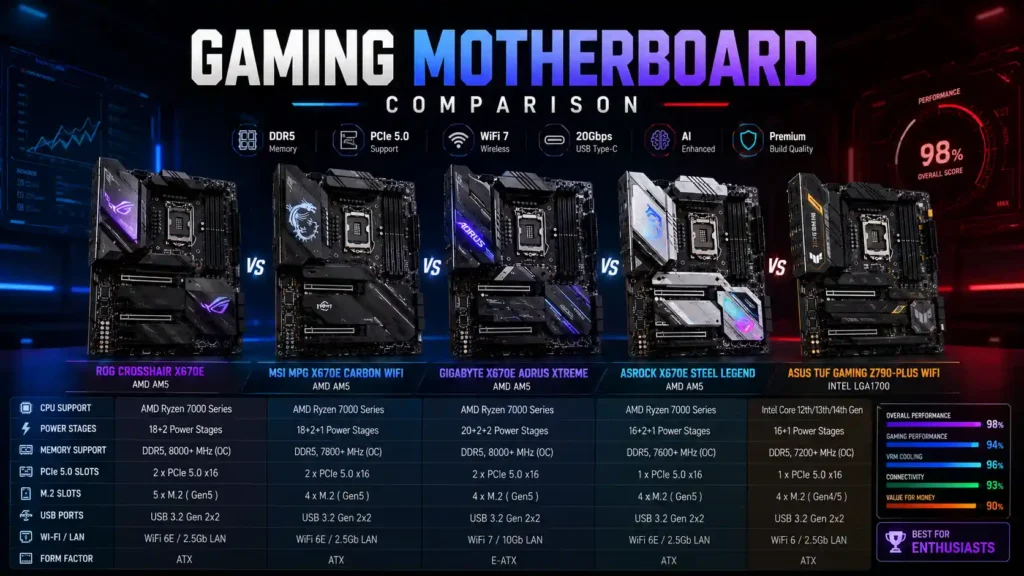
| Motherboard | Socket | Chipset | RAM | PCIe | WiFi | Price | Best For |
|---|---|---|---|---|---|---|---|
| ASUS ROG Crosshair X870E Glacial | AM5 | X870E | DDR5, 256GB | PCIe 5.0 | WiFi 7 | ~$1,199 | Best Overall |
| MSI MEG X870E Godlike | AM5 | X870E | DDR5, 256GB | PCIe 5.0 | WiFi 7 | ~$1,099–1,299 | USB connectivity |
| Gigabyte X870E Aorus Pro | AM5 | X870E | DDR5, 256GB | PCIe 5.0 | WiFi 7 | ~$350–360 | Mid-range X870E |
| ASRock X870E Taichi | AM5 | X870E | DDR5, 256GB | PCIe 5.0 | WiFi 7 | ~$449.99 | Best AMD |
| MSI MAG X870E Tomahawk WiFi | AM5 | X870E | DDR5, 256GB | PCIe 5.0 | WiFi 7 | ~$300–320 | Best ATX |
| ASUS ROG Strix B850-I Gaming WiFi | AM5 | B850 | DDR5, 256GB | PCIe 5.0 | WiFi 7 | ~$349.99 | Best Mini-ITX |
| MSI MAG B850 Tomahawk WiFi II | AM5 | B850 | DDR5, 256GB | PCIe 5.0 | WiFi 7 | ~$250–270 | Best B850 |
| Gigabyte B650 Aorus Elite AX | AM5 | B650 | DDR5, 256GB | PCIe 4.0 (GPU) | WiFi 6E | ~$229.99 | Best Budget |
| MSI Z890 Godlike | LGA1851 | Z890 | DDR5 CUDIMM | PCIe 5.0 | WiFi 7 | ~$1,000–1,330 | Fastest DDR5 |
| Gigabyte Z890 Aorus Pro Ice | LGA1851 | Z890 | DDR5, 256GB | PCIe 5.0 | WiFi 7 | ~$339–400 | Best Intel |
| ASUS ROG Strix B860-F Gaming WiFi | LGA1851 | B860 | DDR5, 256GB | PCIe 5.0 (limited) | WiFi 7 | ~$280–330 | Best B860 |
| ASRock Z790 Steel Legend | LGA1700 | Z790 | DDR5, 256GB | PCIe 5.0 (1 slot) | WiFi 6E | ~$229.99 | Best Budget Intel |
How to Choose the Right Gaming Motherboard
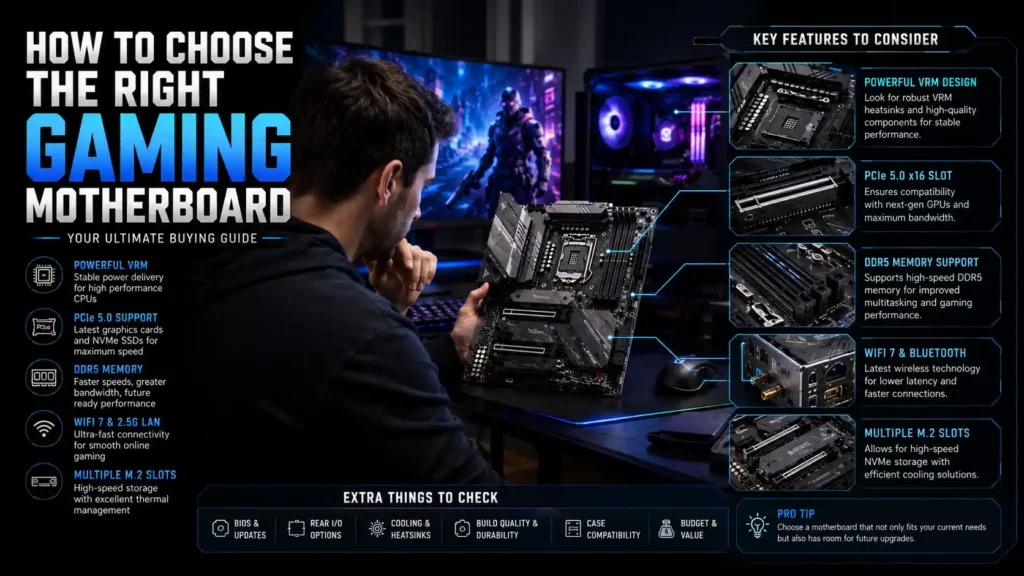
CPU Socket Compatibility
Your CPU determines your socket, and your socket determines every motherboard you can consider. AMD’s current desktop CPUs use the AM5 socket (LGA1718), while Intel’s Core Ultra 200-series chips use LGA1851. Older Intel 12th–14th Gen CPUs use LGA1700, and that socket is not compatible with LGA1851 boards.
Always check the exact CPU model against the motherboard’s supported processor list before buying. A socket match alone doesn’t guarantee compatibility — you may still need a BIOS update for newer CPUs on older board revisions.
AMD vs Intel
Quick answer: AMD currently holds the outright gaming performance lead thanks to 3D V-Cache. The Ryzen 7 9800X3D and the refreshed Ryzen 7 9850X3D lead CPU-bound gaming benchmarks by a meaningful margin over Intel’s Core Ultra 9 285K, largely because the extra stacked L3 cache reduces how often the CPU has to make a slower trip out to system memory during gameplay.
Intel remains competitive in mixed workloads — gaming plus streaming, rendering, or heavy multitasking — where its higher core counts and hybrid P-core/E-core design pay off. If your PC is purely a gaming machine, AMD’s X3D lineup is the safer bet in 2026. If you split time between gaming and productivity work, Intel’s Core Ultra 9 285K closes much of the gap.
Both companies have next-generation platforms on the horizon. AMD is expected to keep extending AM5’s lifespan with further Ryzen 9000-series X3D refreshes, while Intel’s roadmap points toward Core Ultra Series 3 (“Panther Lake”) and a rumored “Nova Lake” successor, both aimed at closing the current gaming gap with AMD.
Neither has shipped on desktop as of this writing, so they shouldn’t factor into a motherboard purchase today — but they’re worth tracking if you’re deciding how long to expect your current socket to remain relevant.
Chipset Differences
Chipset tier controls how many PCIe lanes, M.2 slots, and USB ports your board can offer, plus whether overclocking is unlocked. Higher tiers generally mean more bandwidth, not necessarily better gaming performance.
| Chipset | Platform | PCIe 5.0 | Overclocking | Typical Price Range |
|---|---|---|---|---|
| X870E | AM5 | GPU + Storage | Yes | $350–$1,200+ |
| X870 / B850 | AM5 | GPU or Storage | Yes | $200–$400 |
| B650 | AM5 | Limited | Yes | $130–$300 |
| Z890 | LGA1851 | GPU + Storage | Yes | $250–$1,300+ |
| B860 | LGA1851 | Limited | No | $150–$350 |
| Z790 | LGA1700 | Limited | Yes | $150–$450 |
VRM Quality
VRM stands for voltage regulator module — the circuitry that converts your power supply’s 12V rail into the precise, stable voltage your CPU needs. A weak VRM under a power-hungry CPU throttles clock speeds under sustained load, even with good case cooling.
Most modern boards build their VRM around SPS (Smart Power Stage) components, which combine the MOSFETs and driver circuitry into a single package for better efficiency and thermal density than older discrete designs. When you see a spec sheet listing something like “14+2+1 phases, 80A,” that’s the phase count followed by the current rating of each SPS stage.
A 14+2+1 design with 80A stages is plenty for any current gaming CPU, including 16-core parts like the Ryzen 9 9950X. You only need 24-phase, 110A-class VRMs — the kind found on the Crosshair X870E Glacial or MEG X870E Godlike — if you’re planning serious manual overclocking or running the most power-hungry flagship chips near their limits continuously.
DDR4 vs DDR5
This one’s simple in 2026: every current-generation gaming motherboard from AMD and Intel uses DDR5 exclusively. DDR4 boards for AM4 and older Intel platforms still exist, but none of them support current-generation CPUs, so this isn’t really a decision point for a new build anymore.
DDR5 offers substantially higher bandwidth than DDR4, and newer boards increasingly support CUDIMM modules, which include an onboard clock driver that improves signal stability at very high memory speeds.
PCIe 4.0 vs PCIe 5.0
PCIe 5.0 doubles the per-lane bandwidth of PCIe 4.0. For graphics cards, the real-world gaming difference is currently negligible — even the fastest GPUs on the market don’t saturate PCIe 4.0 x16 bandwidth in most games.
For storage, it’s a different story. The newest PCIe 5.0 SSDs can hit sequential speeds well beyond what PCIe 4.0 allows, which matters for large game installs, video editing, and asset-heavy creative work. If you’re not buying a Gen5 SSD in the near term, don’t pay extra for a board’s Gen5 M.2 slot.
M.2 Slots
M.2 slots host your NVMe SSDs, and the number and speed of those slots varies enormously between boards — from a single Gen4 slot on entry-level options to seven total slots (with expansion cards) on flagship boards. Count how many drives you actually plan to install, including any you might add in a future upgrade.
Watch for lane-sharing. Many boards disable a SATA port or downgrade a secondary M.2 slot when a specific slot is populated, so check the manual’s block diagram, not just the marketing spec sheet.
SATA Ports
SATA ports are increasingly an afterthought on high-end boards as manufacturers prioritize M.2 real estate, but they’re still relevant if you’re keeping older SSDs or spinning hard drives for bulk storage. Budget and mid-range boards typically include four to eight SATA ports; some flagship boards trim this down to make room for extra M.2 slots.
USB Ports
Total USB port count and speed varies dramatically by tier. Budget boards might offer eight to ten rear ports with modest speeds, while flagships can offer 15 or more, including multiple 40Gbps USB4 or Thunderbolt 4 connections.
Think about what you’ll actually plug in: external SSDs benefit enormously from USB4/Thunderbolt bandwidth, while a keyboard, mouse, and webcam don’t need anything beyond basic USB 3.2.
WiFi 6E vs WiFi 7
WiFi 7 is now standard on most X870E, B850, Z890, and B860 boards, and it offers higher theoretical throughput and lower latency than WiFi 6E, particularly on compatible routers using the 6GHz band. WiFi 6E remains common on budget and previous-generation boards like the B650 Aorus Elite AX and Z790 Steel Legend.
Unless you’re on a high-end mesh router that specifically supports WiFi 7, most gamers won’t notice a practical difference — wired Ethernet still beats either standard for latency-sensitive online play.
Bluetooth
Bluetooth 5.4 is the current standard on most 2026 boards and offers modest improvements to connection stability and power efficiency over 5.3 or 5.2. It matters most for wireless peripherals like controllers, headsets, and keyboards, and it’s rarely a deciding factor between two otherwise similar boards.
Audio Codec
Most gaming motherboards use a Realtek ALC codec, ranging from budget ALC897-class chips up to premium ALC4082 or ESS DAC/AMP combinations on flagship boards. If you’re using a USB DAC, external audio interface, or a gaming headset with its own DAC, onboard audio quality matters far less.
If you’re running speakers or a headset directly off the motherboard’s audio jacks, a premium codec is genuinely audible, particularly in dynamic range and background noise floor.
BIOS Flashback
BIOS Flashback lets you update a motherboard’s firmware using just a USB drive and the power supply — no CPU, RAM, or GPU installed. This matters more than it sounds like it should, especially on newer chipsets where early production boards sometimes need a firmware update before they’ll even boot with the latest CPUs.
Nearly every board on our list here includes it, but it’s worth confirming before you buy, particularly on budget boards where it’s occasionally cut to save cost.
Overclocking Support
Overclocking headroom is unlocked on X870E, X870, B850, B650, Z890, and Z790 boards, but disabled on Intel’s B860 chipset. If manual CPU or memory overclocking is part of your plan, a Z-series or X-series board is a requirement on Intel, not just a nice-to-have.
On the AMD side, even budget B650 boards typically support Precision Boost Overdrive and memory overclocking via AMD EXPO, so the chipset restriction that exists on Intel doesn’t really apply.
Motherboard Form Factors
E-ATX
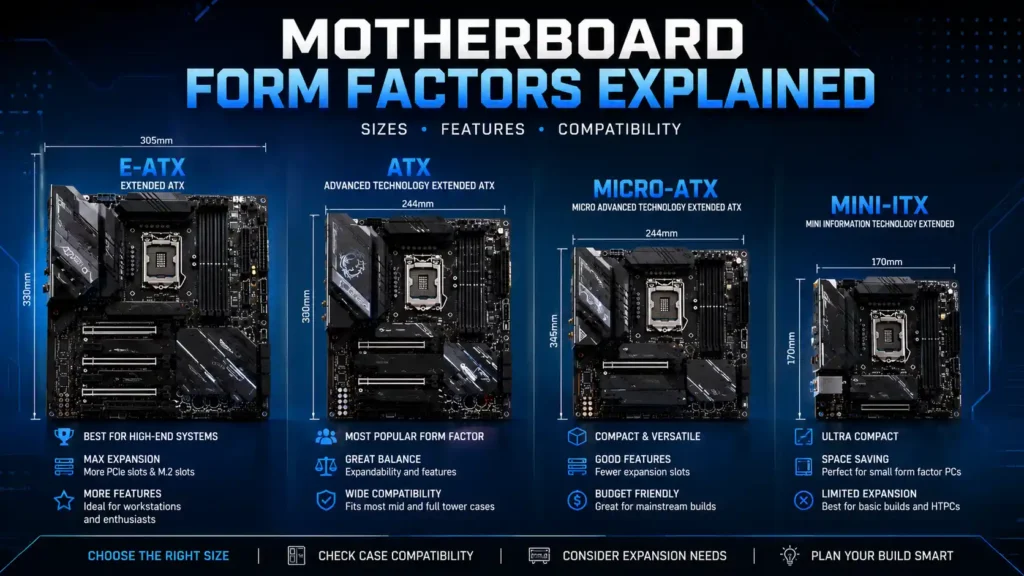
E-ATX boards are wider than standard ATX, typically around 10.5 to 12 inches, giving manufacturers room for extra M.2 slots, larger VRM heatsinks, and more elaborate I/O. Nearly every flagship board on this list, including the Crosshair X870E Glacial and both Godlike boards, uses E-ATX. You’ll need to confirm your case explicitly supports E-ATX before buying one — not all “full tower” cases do.
ATX
ATX is the standard, most widely supported form factor, and it’s what the majority of gaming motherboards use, from budget B650 boards to upper-mid-range X870E options like the ASRock Taichi. If you’re not certain you need E-ATX’s extra features, ATX gives you the widest case compatibility with virtually no feature compromise at the mid-range and above.
Micro-ATX
Micro-ATX trims the board down to roughly 9.6 x 9.6 inches, cutting one or two PCIe slots and sometimes a pair of RAM slots compared to full ATX. It’s a solid middle ground for builders who want a smaller case than full ATX without going all the way to Mini-ITX’s greater expense and installation difficulty.
Mini-ITX
Mini-ITX boards measure just 6.7 x 6.7 inches and are built for small-form-factor cases. You’ll trade PCIe slots (typically just one, for your GPU), RAM slots (usually two instead of four), and some VRM cooling headroom, but modern ITX boards like the ROG Strix B850-I Gaming WiFi have closed much of the feature gap with full-size boards.
Best Motherboard by Budget
Under $100
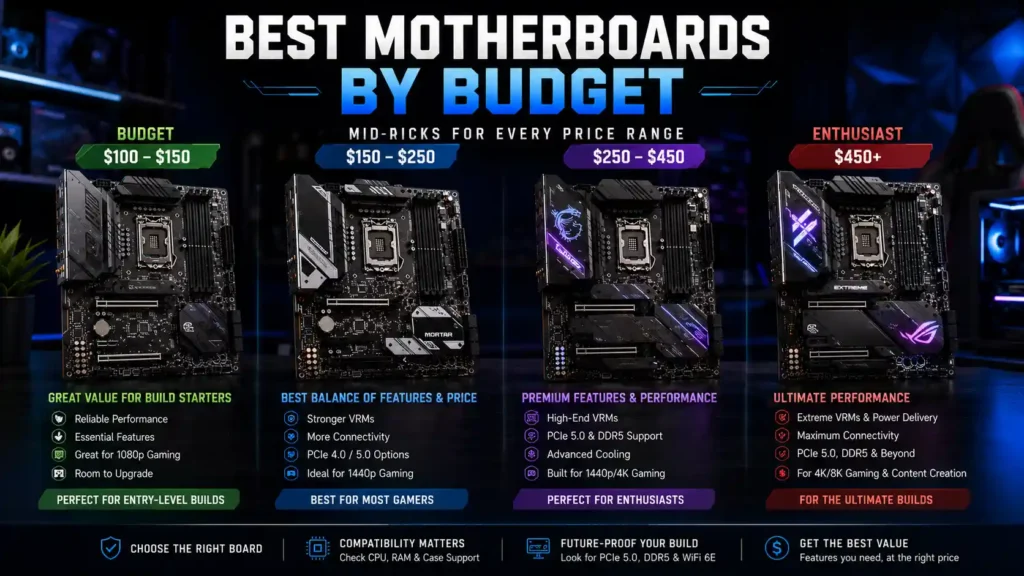
Sub-$100 boards are increasingly rare on current-generation platforms and typically limited to entry-level AM5 options with reduced VRM phases, fewer M.2 slots, and no WiFi. If you’re building on this budget, expect to pair the board with a non-X3D CPU and prioritize a stable power delivery over extra features.
Under $150
This range opens up more usable B650 and older Z790 options with basic WiFi and adequate (if not generous) VRM designs. It’s a reasonable starting point for a budget gaming build paired with a mid-range CPU like the Ryzen 5 7600X.
Under $200
The ASRock Z790 Steel Legend and Gigabyte B650 Aorus Elite AX both hover right around this mark, and it’s arguably the best-value tier on the market. You get DDR5, a capable VRM, and enough M.2 slots for a primary boot drive plus a secondary storage drive.
Under $300
This is where boards like the MSI MAG B850 Tomahawk WiFi II live, and it’s arguably the best value tier on the market right now. You get WiFi 7, dual Gen5 M.2 slots, and a VRM that handles any current mid-range or upper-mid-range CPU without issue.
Under $500
At this level, you’re firmly into flagship-adjacent territory — boards like the ASRock X870E Taichi and Gigabyte Z890 Aorus Pro Ice. Expect true flagship chipset bandwidth, strong VRMs, and premium connectivity like USB4 or Thunderbolt 4, without the four-figure price tag of the true top-tier boards.
Premium ($500+)
Above $500, you’re paying primarily for extras: more M.2 slots than most builds will ever use, dual 10GbE networking, LCD monitoring panels, and VRMs engineered for extreme overclocking rather than everyday gaming. These boards make sense for showcase builds and enthusiasts who actually use the extra features, not for incremental gaming performance.
Best Motherboards for Different CPUs
Ryzen 7 9800X3D
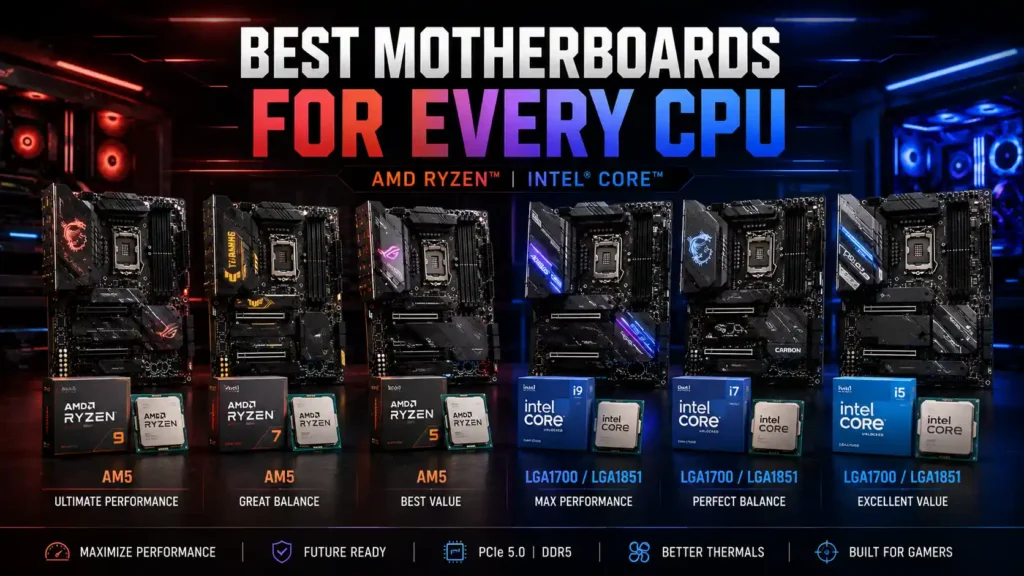
The 9800X3D’s 120W TDP doesn’t demand a flagship VRM, which makes the MSI MAG X870E Tomahawk WiFi our recommended pairing — you get full X870E bandwidth and plenty of VRM headroom without overspending on power delivery you won’t use.
Ryzen 9 9950X
Sixteen cores under sustained multi-threaded load pull meaningfully more power than an 8-core X3D chip, so we’d step up to the MSI MEG X870E Godlike or ASUS ROG Crosshair X870E Glacial here. Both offer VRMs with real headroom for sustained all-core boost clocks.
Ryzen 7 7800X3D
This is a previous-generation CPU that doesn’t need X870E’s extra PCIe bandwidth to perform at its best in games. The Gigabyte B650 Aorus Elite AX is plenty of motherboard for it, and the money saved is better spent on GPU or memory.
Intel Core Ultra 9
For the Core Ultra 9 285K’s full 250W turbo power draw, we’d recommend the MSI MEG Z890 Godlike or Gigabyte Z890 Aorus Pro Ice — both have VRMs rated well beyond what this CPU needs even under sustained all-core loads.
Intel Core Ultra 7
The Core Ultra 7’s lower power ceiling pairs well with the ASUS ROG Strix B860-F Gaming WiFi, which gives you Thunderbolt 4 and strong memory overclocking support without paying for Z890’s full overclocking suite.
Common Mistakes When Buying a Motherboard
- Buying the wrong socket. Double-check your exact CPU model against the board’s supported CPU list — AM5, LGA1851, and LGA1700 are not interchangeable, and even boards on the same socket sometimes need a BIOS update before a specific CPU will boot.
- Choosing weak VRMs. A budget board paired with a flagship CPU can throttle under sustained gaming or rendering loads, even with excellent case cooling. Match VRM quality to your CPU’s actual power draw, not just its price bracket.
- Ignoring BIOS support. Some early-production boards ship with firmware that doesn’t recognize the newest CPUs out of the box. Check whether the board supports BIOS Flashback, and update firmware before installing a brand-new CPU generation.
- Buying unnecessary PCIe lanes. Paying extra for X870E or Z890’s full PCIe 5.0 bandwidth only makes sense if you’re actually using a PCIe 5.0 GPU or SSD. Most builders won’t notice the difference against a well-specced B-series board.
- Ignoring RAM compatibility. Check the motherboard’s QVL (Qualified Vendor List) for your specific memory kit, especially if you’re targeting high DDR5 speeds like 8000 MT/s or above. Not every kit that “should” work actually boots reliably at rated speed on every board.
Do You Really Need an Expensive Motherboard?
Budget Gamers
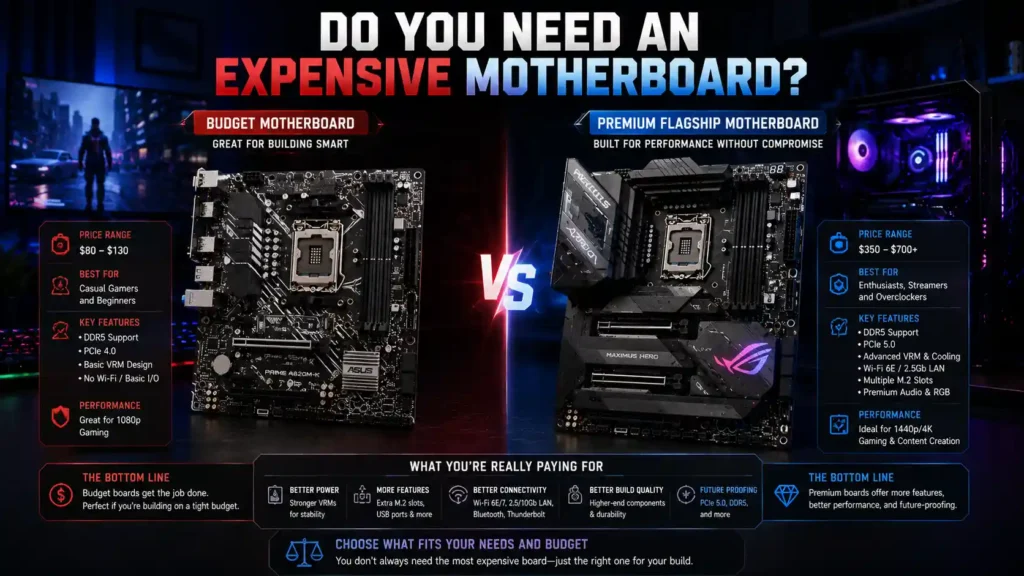
No. If your PC is dedicated purely to gaming, a well-specced $200–$300 board gives you essentially the same in-game frame rates as a $1,000 flagship, provided the VRM is adequate for your CPU. Put the savings toward your GPU instead.
Competitive Gamers
Mostly no. Wired networking, low input latency, and a stable, high-refresh display matter far more to competitive performance than motherboard tier. The one place a pricier board pays off is if you’re chasing every last percent of memory-timing-driven frame time consistency in esports titles.
Streamers
Sometimes yes. If you’re encoding on the CPU, running OBS, and gaming simultaneously, a more robust VRM and better USB connectivity for capture cards and audio interfaces meaningfully helps. A mid-range X870E or Z890 board is a reasonable upgrade target here.
Content Creators
Often yes. Multiple fast NVMe drives, 10GbE or Thunderbolt for fast file transfers, and a VRM that handles sustained render loads are all things flagship and upper-mid-range boards deliver better than budget options. This is where paying for a Godlike or Crosshair-tier board is most likely to translate into real productivity gains.
Gaming Motherboard Buying Checklist
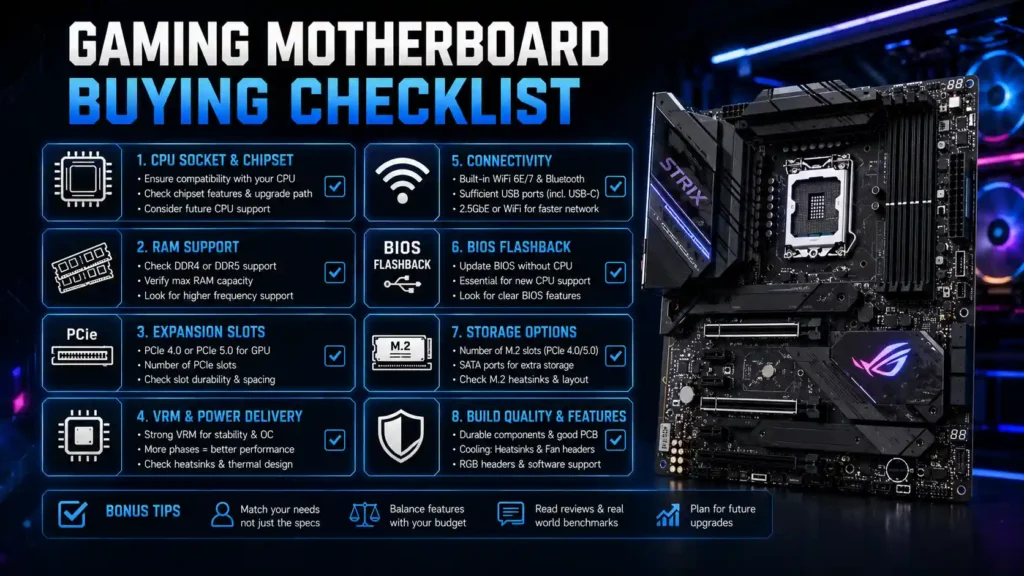
- CPU Compatibility: Confirm exact socket and BIOS support for your specific CPU model
- Chipset: Match chipset tier to the PCIe bandwidth and overclocking support you actually need
- RAM Support: Check the QVL for your memory kit’s speed and capacity
- Storage: Count required M.2 and SATA ports, and check for lane-sharing restrictions
- Networking: Decide whether WiFi 7, 5GbE/10GbE, or basic Gigabyte Ethernet fits your setup
- Cooling: Match VRM phase count and amperage to your CPU’s actual power draw
- Expansion: Verify PCIe slot count and form factor fits your case and add-in card plans
- Future Upgrades: Consider whether the socket and chipset will support next-generation CPU refreshes
Frequently Asked Questions
Which motherboard brand is the most reliable?
There’s no single most reliable brand across the board — ASUS, MSI, Gigabyte, and ASRock all make excellent and mediocre boards depending on the specific model and price tier. Reliability tends to correlate more strongly with price tier within a brand’s lineup than with the brand itself, so check reviews of the specific board you’re considering rather than relying on brand reputation alone.
ASUS vs MSI vs Gigabyte vs ASRock
ASUS generally leads in software polish and BIOS usability, MSI tends to offer strong value in its MAG lineup and aggressive I/O in its MEG flagships, Gigabyte’s Aorus line often wins on price-to-feature ratio, and ASRock’s Taichi series consistently punches above its price point on VRM quality. All four brands make genuinely good boards; the differences show up most in software experience, specific feature choices, and price at a given spec level.
Is MSI better than ASUS?
Neither is categorically better — it depends on the specific boards you’re comparing. MSI’s MAG Tomahawk series tends to offer stronger value than ASUS’s equivalent Strix boards, but ASUS generally has an edge in BIOS interface design and long-term software support.
Do gaming motherboards improve FPS?
Directly, no — your CPU and GPU determine frame rates, not the motherboard. Indirectly, a motherboard can affect performance if its VRM throttles your CPU under load, if RAM isn’t running at its rated speed due to poor memory compatibility, or if PCIe lane restrictions bottleneck a fast SSD or GPU.
How much should I spend on a motherboard?
For most gaming builds, 10–15% of your total budget on the motherboard is a reasonable target. That typically lands you in the $200–$350 range on a $2,000 build, which is enough for a well-specced board without pulling money away from your GPU.
Do I need PCIe 5.0?
Not urgently. Current GPUs don’t saturate PCIe 4.0 x16 bandwidth in real-world gaming, and PCIe 5.0 SSDs, while fast, are only meaningfully faster for large sequential transfers rather than typical game loading. It’s a reasonable feature to have for longevity, but not worth paying a large premium for today.
Is DDR5 worth it?
Yes, and it’s no longer really optional — every current AMD and Intel gaming platform requires DDR5. The good news is DDR5 pricing has become far more reasonable since its early days, and it offers a genuine bandwidth improvement over DDR4 that benefits both gaming and productivity workloads.
Which motherboard is best for Ryzen 7 9800X3D?
The MSI MAG X870E Tomahawk WiFi is our top pick — it gives the 9800X3D full X870E chipset bandwidth and more than enough VRM headroom for its 120W TDP, without paying for flagship-tier power delivery this CPU doesn’t need.
Which motherboard is best for Intel Core Ultra?
For the Core Ultra 9 285K, the Gigabyte Z890 Aorus Pro Ice offers the best balance of VRM headroom, M.2 storage, and Thunderbolt 4 connectivity for the price. For the lower-power Core Ultra 7 tier, the ASUS ROG Strix B860-F Gaming WiFi is a strong, less expensive alternative.
How long does a motherboard last?
A well-built motherboard can physically last a decade or more, but practical platform lifespan is usually shorter — typically three to five years before a new CPU socket makes an upgrade attractive. AMD has generally supported AM5 across multiple CPU generations, which extends a board’s useful life longer than most Intel sockets have historically offered.
Should I buy WiFi or non-WiFi motherboard?
If you plan to use Ethernet exclusively, a non-WiFi SKU saves a small amount of money with zero practical downside. If there’s any chance you’ll need wireless connectivity — even as a backup — the WiFi version is worth the modest premium, since retrofitting a WiFi card later is more hassle than it’s worth on most builds.
Is BIOS Flashback important?
Yes, particularly if you’re buying a motherboard and CPU from the same new generation at the same time. BIOS Flashback lets you update firmware without a working CPU installed, which matters if your specific board sample shipped with firmware that predates support for your new processor.
Final Verdict
If you want the simplest possible answer: the ASRock X870E Taichi and Gigabyte Z890 Aorus Pro Ice are our two strongest overall recommendations for AMD and Intel builders respectively, balancing genuine flagship-adjacent features against realistic pricing.
If budget is the priority, the Gigabyte B650 Aorus Elite AX and ASRock Z790 Steel Legend both deliver DDR5, full CPU compatibility, and capable VRMs for around $230 — money that’s better spent on your GPU than on motherboard features you won’t use.
And if you’re building a showcase system with no budget ceiling, the ASUS ROG Crosshair X870E Glacial and MSI MEG Z890 Godlike remain the most complete, feature-dense boards on their respective platforms. Match the board to your CPU’s actual power needs and your storage and networking plans, not to the biggest number on the spec sheet, and you’ll end up with the right board regardless of which brand you choose.