20 Most GPU Intensive Games in 2026: Push Your Graphics Card to the Limit
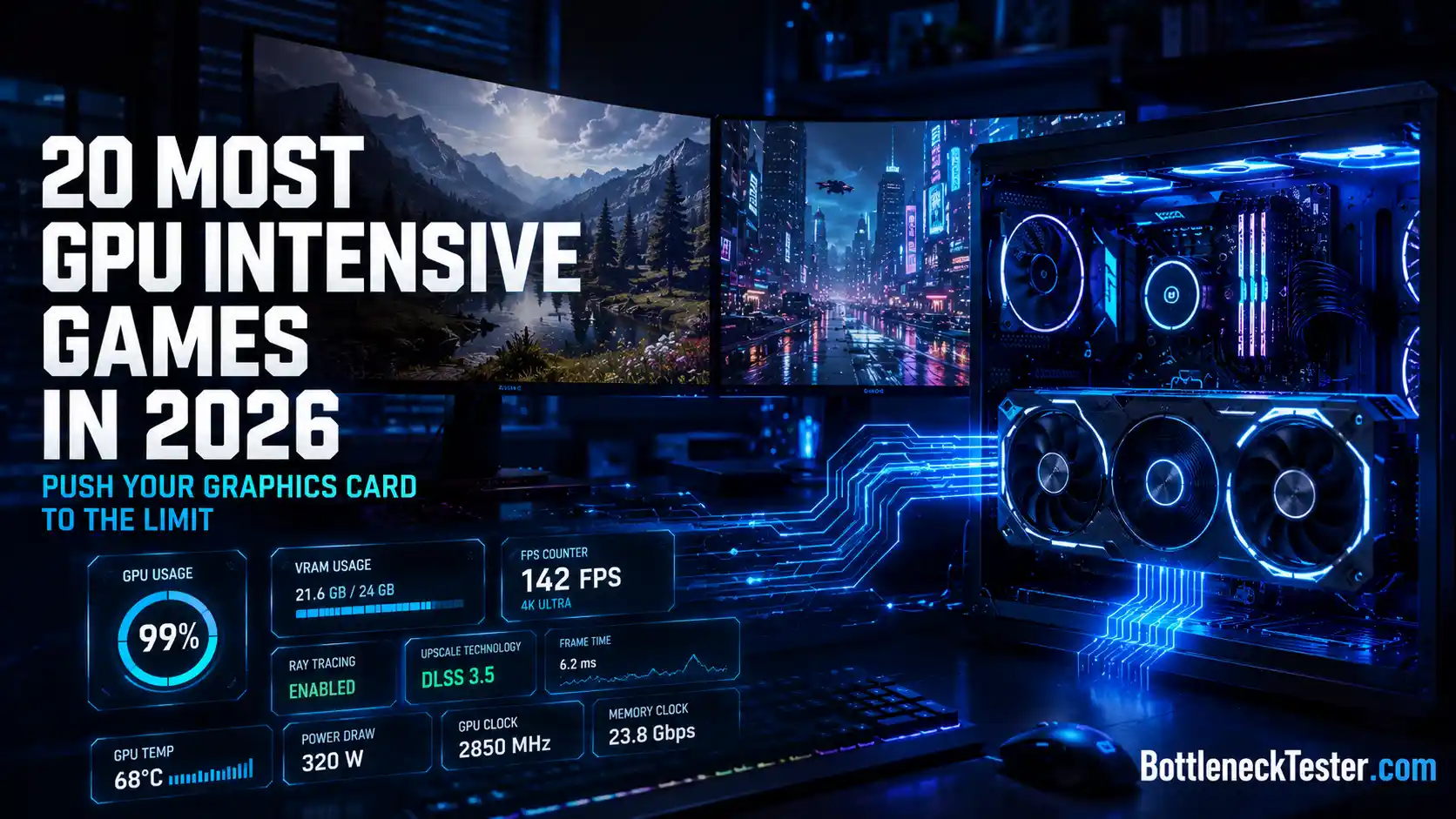
Some games run on almost anything. These aren’t those games.
The titles on this list share one thing in common: they treat your graphics card like a stress test. Ray-traced global illumination, path tracing, massive open worlds, and texture packs measured in double-digit gigabytes have turned a handful of 2024-2026 releases into the new benchmark standard for PC hardware.
This guide breaks down exactly which games hit hardest, why they hit that hard, and what you actually need to run them without your GPU fans sounding like a jet engine.
What Makes a Game GPU Intensive?
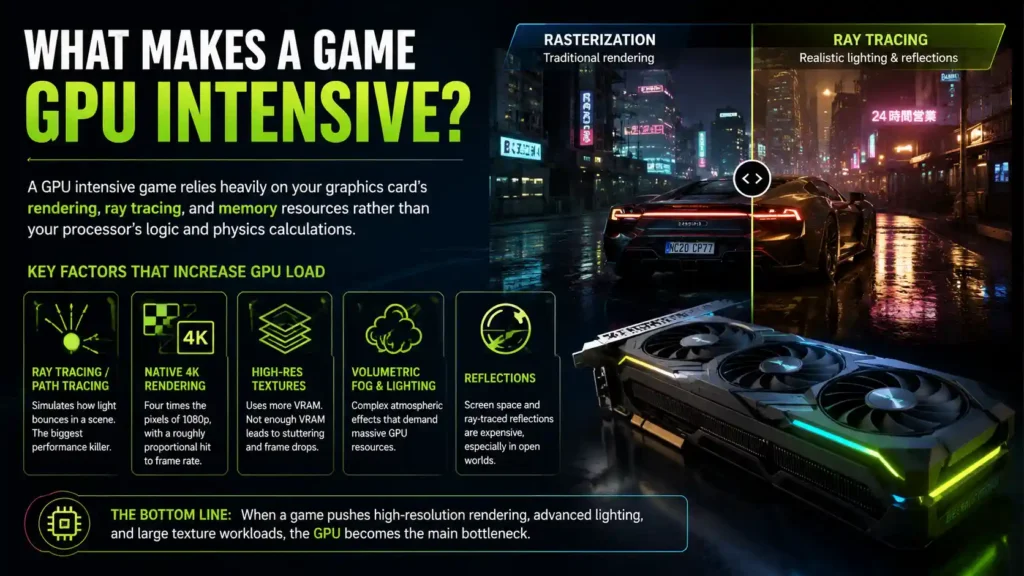
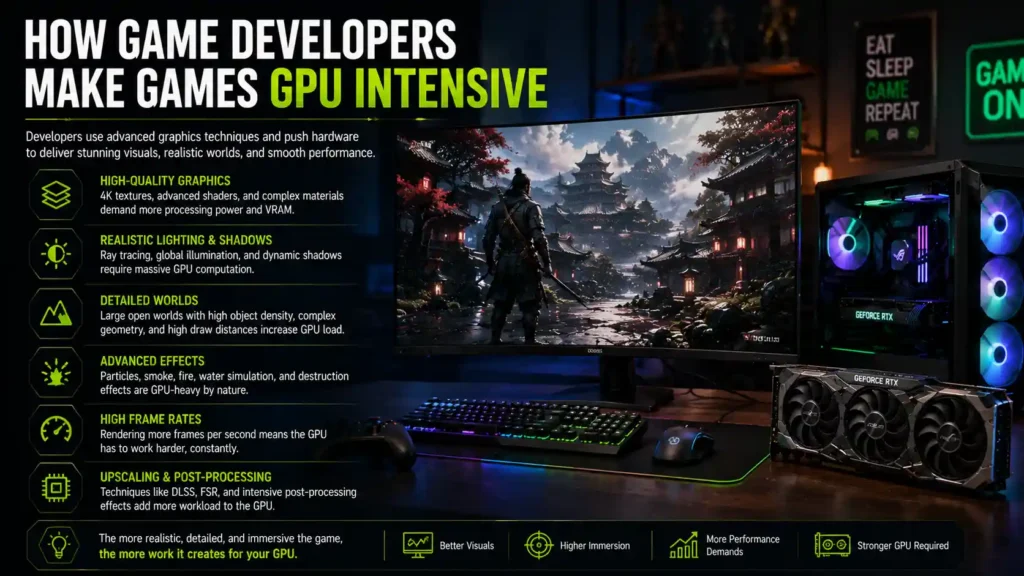
A GPU intensive game leans heavily on your graphics card’s rendering, ray tracing, and memory resources rather than your processor’s logic and physics calculations.
That distinction matters more than most players realize. Two games can look similarly demanding on paper and stress completely different parts of your PC.
GPU vs CPU Intensive Games
GPU-bound games spend most of their processing budget on pixels: shading, lighting, reflections, and resolution. Cyberpunk 2077 with path tracing enabled is a textbook example — turn on ray tracing and your frame rate drops even if your CPU sits idle.
CPU-bound games spend their budget on simulation: AI, physics, NPC counts, and world logic. Monster Hunter Wilds and S.T.A.L.K.E.R. 2 both lean surprisingly hard on the CPU because of constant world streaming and complex creature or NPC behavior, even though they also punish your GPU with ray tracing.
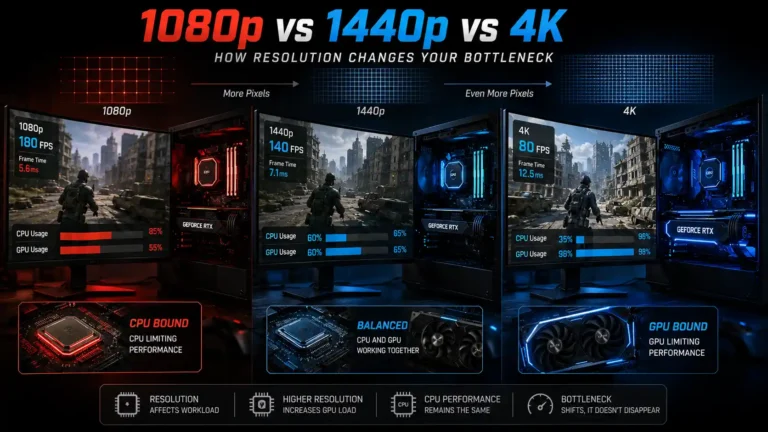
The practical test: lower your resolution. If frame rates jump significantly, the game was GPU-bound. If they barely move, your CPU or RAM is the bottleneck.
Graphics Features That Increase GPU Load
A few specific settings account for almost all of the GPU load in modern games:
- Ray tracing / path tracing — simulates how light bounces around a scene instead of faking it. The single biggest FPS killer on this list.
- Native 4K rendering — four times the pixels of 1080p, with a roughly proportional hit to frame rate.
- High-resolution texture packs — these hit VRAM capacity rather than raw compute power, which is why a fast GPU with too little memory can still stutter.
- Volumetric fog and lighting — used heavily in Monster Hunter Wilds’ weather system and Alan Wake 2’s forests.
- Screen space and ray-traced reflections — expensive in water-heavy or urban environments.
Minimum vs Recommended GPU Requirements
Publishers list minimum specs to hit roughly 30 FPS at 1080p on low settings, often relying on upscaling to get there. Recommended specs usually target 60 FPS at 1080p or 1440p on medium-to-high settings.
Here’s the part that trips people up: in 2024-2026 releases, several publishers (Capcom, MachineGames, GSC Game World) now build DLSS or FSR upscaling into their minimum spec sheets by default. That means the “native resolution” your GPU actually renders is often lower than what’s advertised, even at minimum settings.
How We Chose These GPU Demanding Games
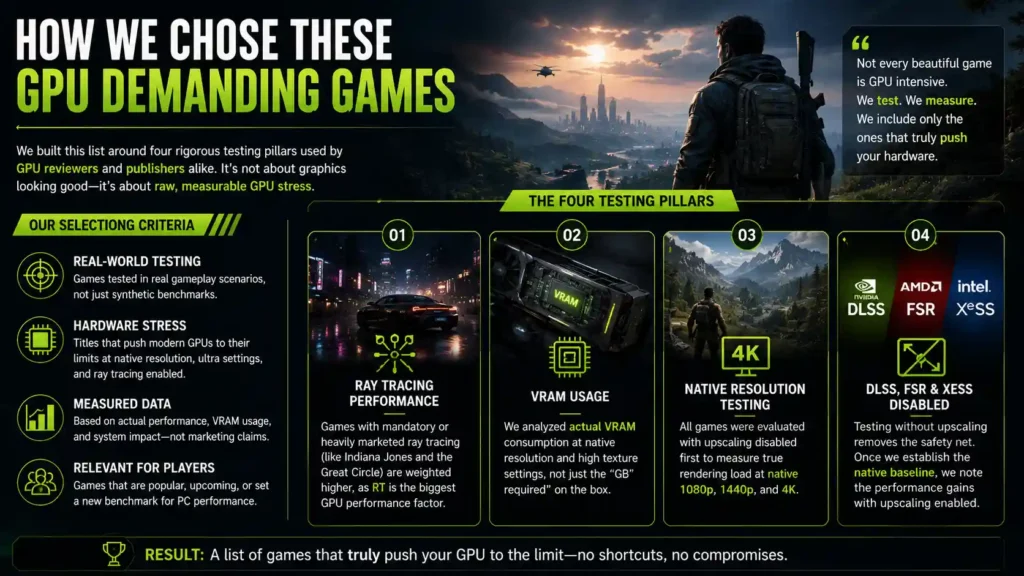
We built this list around four testing pillars used by GPU reviewers and publishers alike, rather than subjective “these graphics look nice” impressions.
Ray Tracing Performance
Games that ship with mandatory or heavily-marketed ray tracing — Indiana Jones and the Great Circle requires it even at minimum settings — were weighted higher than games where ray tracing is a nice-to-have toggle.
VRAM Usage
We looked at actual measured VRAM consumption at native resolution and high texture settings, not just the “GB required” number on the box, since allocation and real usage frequently differ.
Native Resolution Testing
Every game here was evaluated with upscaling disabled first. A game that only looks reasonable through DLSS Performance mode is a different animal from one that holds up natively, and we wanted to separate true rendering load from upscaling assistance.
DLSS, FSR, and XeSS Disabled
Testing native performance strips out the crutch. Once we established the native baseline, we noted how much headroom upscaling adds back, since most players will use it anyway.
20 Most GPU Intensive Games
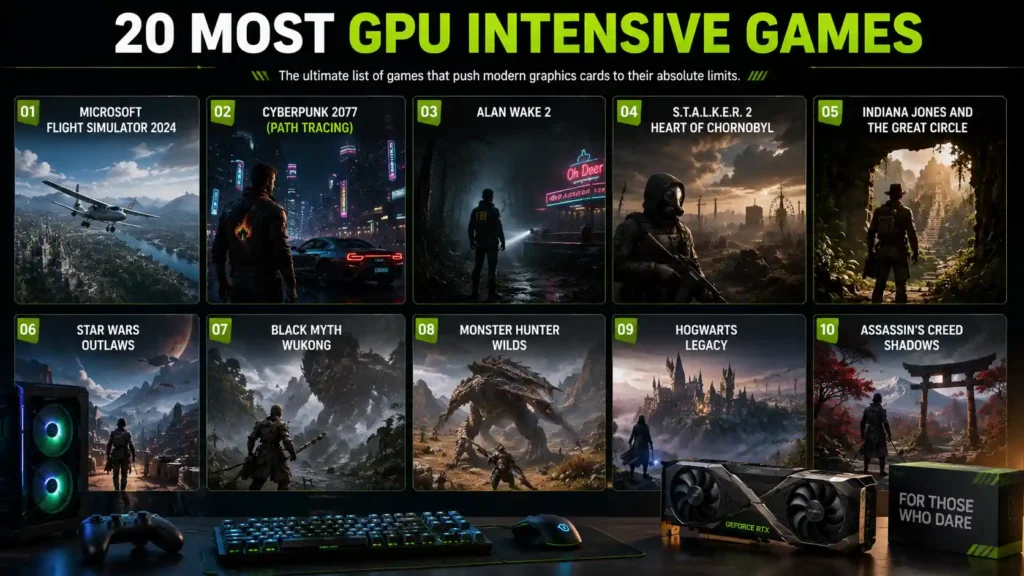
1. Microsoft Flight Simulator 2024
GPU Requirements: Asobo’s simulator streams real-time satellite imagery and photogrammetry rather than relying on baked-in scenery, which is why its official specs look unusual next to a normal AAA game. Minimum settings only ask for a GTX 970 or RX 5700, but the “ideal” tier recommends an RTX 4080 or RX 7900 XT and, notably, 64GB of system RAM.
Recommended Graphics Cards: Asobo’s own recommended tier lists an RTX 2080 or RX 5700 XT, while testing shows 8GB cards running short of VRAM at native 4K once frame generation and upscaling are both active.
Average FPS: Independent testing puts a mid-range setup (Ryzen 7-class CPU, RTX 3060) around 65-82 FPS at 1080p High settings, with performance dropping over dense, data-heavy cityscapes regardless of GPU tier, since the bottleneck there is often the live data stream rather than raw rendering power.
2. Cyberpunk 2077 (Path Tracing)
CD Projekt Red’s Overdrive Mode, officially supported on RTX 40-series cards, remains one of the purest GPU torture tests available. CD Projekt Red requires an RTX 3090 or 3090 Ti for 1080p at 30 FPS, or an RTX 4070 Ti or faster for smoother performance.
Without any upscaling, Nvidia’s RTX 4090 runs the game at roughly 18 FPS at 4K with Overdrive Mode engaged. Turning on DLSS frame generation changes that picture entirely, pushing the same card to nearly 100 FPS. At 1080p and 1440p natively, performance is considerably healthier, with the RTX 4090 hitting around 45 FPS at 1440p and over 60 FPS at 1080p.
The takeaway: path tracing in Cyberpunk 2077 isn’t something you enable and forget. It’s a feature you build your entire settings profile around, upscaling included.
3. Alan Wake 2
Remedy’s survival horror sequel uses fully path-traced lighting as an option on Nvidia hardware, alongside dense forest environments and volumetric fog that punish GPUs even with ray tracing off. Expect an RTX 4070 Ti or RX 7900 XT for solid 1440p performance without path tracing, and an RTX 4080 or better if you want path tracing at anything above 1080p.
4. Black Myth: Wukong
At its Ultra preset with full ray tracing at very high settings, Black Myth: Wukong recommends an RTX 4080 Super or equivalent with 16GB of VRAM, alongside 32GB of system RAM.
Ray tracing scales dramatically here. On an RTX 4090 at native 4K with 2x frame generation, “Very High” ray tracing settings average 35 FPS, while dropping ray tracing entirely nearly doubles that to 77.6 FPS. VRAM usage climbs past 13GB at native 4K with Very High ray tracing, while turning ray tracing off keeps usage under 10GB.
A useful modern rule of thumb from current testing: 8GB of VRAM is workable at 1080p, 12GB is comfortable at 1440p, and 16GB is the practical target for 4K with ray tracing enabled.
5. Monster Hunter Wilds
Capcom’s RE Engine open-world hunter has become a case study in VRAM appetite. The game uses almost 20GB of VRAM at its highest quality settings, with usage staying fairly consistent across 1080p and 1440p rather than scaling heavily with resolution.
Ultra settings call for an RTX 4070 Ti Super or RX 7800 XT with 16GB of VRAM, and Capcom notes that a 12GB card can work but may struggle to display high-resolution textures correctly. Ray tracing here is comparatively light in scope — reflections are the main use case, costing a 7-8% performance drop when enabled, even in scenes without much reflective geometry.
Recommended Graphics Cards: RTX 4070 Ti Super, RX 7800 XT, or better for the 16GB high-texture experience at 1440p and above.
6. S.T.A.L.K.E.R. 2: Heart of Chornobyl
GSC Game World’s open-world shooter shipped without official hardware ray tracing support, but community-enabled ray tracing mods reveal just how demanding the Zone can get. Even 12GB graphics cards run into difficulty at ultra settings with ray tracing enabled, and 16GB is recommended for a comfortable experience. Without ray tracing, the game stays under 8GB of VRAM at 1080p and around 10GB at 4K, but the sheer shading workload still grinds down GPUs that aren’t top-tier.
This is one of the rare titles here where CPU load rivals GPU load, thanks to constant open-world asset streaming and AI-driven factions.
7. Indiana Jones and the Great Circle
MachineGames built ray tracing into the minimum specification, a first for a AAA release at this scale. Even the lowest preset at 1080p (upscaled) requires an RTX 4070 with hardware ray tracing support, alongside a Core i7-10700K or Ryzen 5 3600 CPU.
VRAM demands scale steeply too. The game uses up to 15GB of graphics memory at 4K on its “Supreme” texture setting, dropping to around 13GB at “Very Ultra” and staying under 12.5GB at “Ultra.” Recommended settings without path tracing call for RTX 3080 Ti-tier performance, while path tracing configurations demand an RTX 4080.
8. Avatar: Frontiers of Pandora
Ubisoft’s Snowdrop-engine title remains one of the more punishing ray tracing implementations around, even years after launch. Only the RTX 4090 clears 60 FPS with ray tracing enabled at 4K, and 4K rasterized performance without ray tracing still requires an RTX 4080 or AMD’s RX 7900 XTX to stay playable.
VRAM allocation is aggressive by design. The Snowdrop engine measured over 15GB at 4K “Ultra,” and even 1080p on “Low” settings used 11GB, though these figures reflect allocation rather than strict per-frame usage.
9. Kingdom Come: Deliverance II
Warhorse Studios’ medieval RPG scales from remarkably modest minimum specs to a genuinely demanding high end. Hitting either 1440p at 60 FPS or 4K at 30 FPS requires an RTX 4080 or RX 7900 XT, paired with a Core i7-13700K or Ryzen 7 7800X3D and 32GB of RAM.
Unlike most games on this list, KCD2 doesn’t lean on ray tracing for its difficulty — its dense forests, crowd simulation, and long draw distances are what push GPUs, making it a rare case of a rasterization-heavy demanding title.
10. Star Citizen
Cloud Imperium Games’ persistent-universe sim is still in alpha, and its official July 2026 minimum spec looks almost absurdly light: a quad-core CPU and a GPU with just 4GB of VRAM. In practice, that “minimum” is closer to a slideshow in populated cities, and the community’s practical baseline sits far higher.
For a genuinely playable experience, that means a six-core CPU, 32GB of RAM, and a GPU in the RTX 3060 Ti class or above with 8GB or more of VRAM. The game is unusually CPU-bound for something on this list — a mid-tier RTX 3060 paired with a fast CPU like the Ryzen 7 7800X3D can outperform an RTX 4090 paired with an older chip, since server meshing and NPC simulation lean harder on the processor than the graphics card.
11. Crimson Desert
Pearl Abyss’s open-world action RPG launched with surprisingly accessible minimum specs for its visual scope. The minimum requirements call for a GTX 1060 and an 8th-generation Intel i5 processor, while decent visual settings require something closer to an RTX 2060.
The gap between minimum and high-end settings is enormous, though. 4K play with a high level of ray tracing demands considerably more powerful hardware than the accessible minimum spec suggests. The game’s proprietary BlackSpace engine renders draw distances larger than Red Dead Redemption 2’s, and that scale shows up hardest in outdoor, ray-traced scenes.
12. Resident Evil Requiem
Capcom’s RE Engine survival horror entry, released February 2026, sits in an odd spot: its official hardware demand rating lands at 5.6 out of 10, described as “significantly demanding” rather than extreme. Minimum specs call for a GeForce GTX 1660 or Radeon RX 5500 XT, while recommended settings target a GeForce RTX 2060 Super or Radeon RX 6600.
The demanding part comes from optional path tracing and DLSS 4 support layered on top of those base specs — enabling full path tracing at native 4K pushes VRAM and GPU load well past what the official minimum and recommended tiers suggest.
13. The Last of Us Part I
Naughty Dog’s remake earned its reputation at launch for VRAM usage that outpaced almost everything else on shelves in 2023, and testing found allocation of 10.5GB even at a modest 1600×900 resolution. At native 4K, usage climbs to roughly 14GB, enough to squeeze even a 12GB RTX 4070 Ti.
For 60 FPS at 1080p, a GeForce RTX 2080 Ti, RTX 3070 Ti, or Radeon RX 6700 XT is the practical floor. Hitting the same frame rate at 4K realistically calls for an RTX 4090 or RX 7900 XTX, since these are the only two cards that clear 60 FPS natively at that resolution.
14. Hogwarts Legacy
Avalanche Software’s open-world RPG became one of the defining VRAM stress tests of 2023, and later patches added ray tracing without making it any lighter. At native 4K with ray tracing maxed, VRAM usage climbs to around 16GB, dropping to roughly 12GB with ray tracing disabled.
Ray tracing also costs more here than in most games on this list — an RTX 4090 drops from 121 FPS to 72 FPS at 4K when ray-traced shadows and reflections are enabled, even with frame generation active. For an ultra 4K experience, Avalanche’s own recommendation lands on an RTX 3090 Ti or RX 7900 XT, while 1440p at ultra settings is comfortable on an RTX 2080 Ti or RX 6800 XT.
15. Returnal
Housemarque’s roguelike shooter, ported from PS5, punishes GPUs hardest once ray-traced shadows and reflections are switched on. At native 4K with everything maxed and ray tracing enabled, the game calls for a card in the RTX 3080 Ti or RX 6800 XT class, and testing found only the RX 7900 XTX and RTX 4090 sustained a full 60 FPS at native 4K.
VRAM matters more than raw compute here: high texture settings alone can chew through over 8GB, so an 8GB card is the realistic minimum even before ray tracing enters the picture.
16. Starfield
Bethesda’s space RPG is a well-documented CPU-and-GPU dual threat, and New Atlantis is where both get tested at once. At native 4K on Ultra settings, only the fastest GPUs from AMD and Nvidia clear 60 FPS, and even the RTX 4090 posts nearly identical frame rates across 1080p, 1440p, and 4K, a clear sign the CPU is the limiting factor rather than the GPU.
VRAM demands are comparatively tame — Ultra settings at 4K use under 8GB without upscaling — but crowd density is the setting most likely to tank your frame rate in the game’s busiest cities, regardless of which GPU you own.
17. Ark: Survival Ascended
Studio Wildcard’s ground-up Unreal Engine 5 rebuild adds Lumen global illumination and Nanite geometry streaming to a game that was already known for punishing hardware in its original form. Official specs list a GTX 1080 or RX 5600 XT as the minimum, and an RTX 3080 or RX 6800 as recommended — but real-world testing shows even mid-range systems on Epic settings landing around 35-50 FPS at 1080p before any optimization.
Texture quality is the main VRAM lever: High textures push past 8GB in complex environments, and Epic textures can exceed 10GB. Base-building and tribe-heavy multiplayer servers add further load on top of that baseline.
18. Forza Horizon 5
Playground Games’ open-world racer is proof that a game doesn’t need ray tracing to strain a GPU, though it has that too. Officially, Playground’s “Ideal” tier for 4K Ultra at 60+ FPS calls for an RTX 3080 or RX 6800 XT with 16GB of RAM — modest by 2026 standards, which speaks to how well-optimized this title remains years after launch.
Ray tracing was added post-launch for races and photo mode, not just the Forzavista showroom, and it’s genuinely demanding at its Ultra and Extreme presets. Mexico’s varied biomes and dense foliage at high speed still make this one of the more GPU-hungry racers around, even without ray tracing switched on.
19. Control
Remedy’s earlier ray tracing showcase, built around translucent reflections and destructible environments inside the Oldest House, was one of the first true ray tracing stress tests on PC and still holds up as a demanding title years later. At native 4K on High settings, testing found even a GTX 1080 Ti limping to 23 FPS, with the RTX 2080 Ti only reaching 41 FPS.
Ray tracing pushes those numbers down further without DLSS to compensate, which is exactly why Nvidia leaned on Control so heavily to demonstrate DLSS’s value when the feature first launched.
20. Modded Skyrim (Ultra Graphics)
A decade-old game that, once loaded with 4K texture replacers and an ENB lighting overhaul, can outstrip the VRAM demands of most 2026 AAA releases. Skyrim Special Edition’s 64-bit engine removed the old 3.5GB memory ceiling that plagued the original release, so it will now use as much VRAM as the hardware allows.
Community testing on heavily modded setups (300+ mods, 4K landscape textures, a demanding ENB preset) shows VRAM usage landing around 12-15GB even at 1080p, and users running similar 4K texture and parallax setups routinely report needing 8GB as a floor and 12GB or more for a comfortable margin. This is a rare case on this list where the bottleneck is almost entirely self-inflicted — the vanilla game runs on a potato, but the mod list decides how much VRAM it actually needs.
GPU Requirements Comparison Table
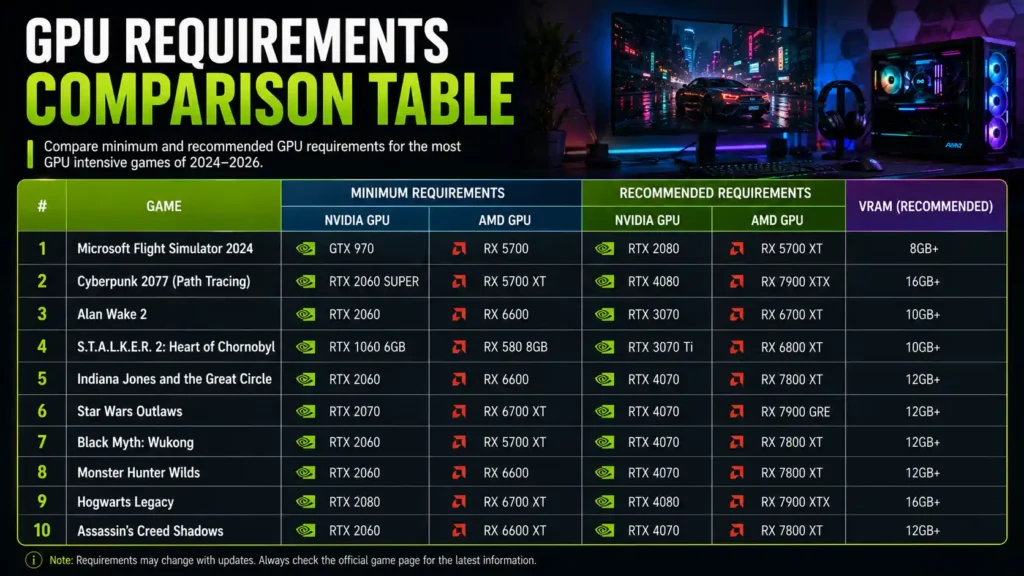
| Game | 1080p | 1440p | 4K | VRAM | Ray Tracing |
|---|---|---|---|---|---|
| Microsoft Flight Simulator 2024 | RTX 4060 Ti | RTX 4070 | RTX 4080 Super | 8-12GB | Limited |
| Cyberpunk 2077 (Path Tracing) | RTX 4070 Ti | RTX 4080 | RTX 4090 | 10-14GB | Mandatory for mode |
| Alan Wake 2 | RTX 4060 Ti | RTX 4070 Ti | RTX 4080 | 8-12GB | Optional (path tracing) |
| Black Myth: Wukong | RTX 3060 | RTX 4070 | RTX 4080 Super | 8-16GB | Optional |
| Monster Hunter Wilds | RTX 2070 Super | RTX 4070 Ti Super | RTX 4080+ | 8-20GB | Limited |
| S.T.A.L.K.E.R. 2 | RTX 2070 Super | RTX 4070 | RTX 4080 | 6-16GB | Unofficial mod |
| Indiana Jones and the Great Circle | RTX 4070 | RTX 4070 Ti+ | RTX 4090 | 10-15GB | Mandatory |
| Avatar: Frontiers of Pandora | RTX 3060 Ti | RTX 4070 | RTX 4080/4090 | 8-15GB | Optional |
| Kingdom Come: Deliverance II | GTX 1060 | RTX 3070 | RTX 4080 | 6-12GB | None |
| Star Citizen | RTX 3060 Ti | RTX 4070 | RTX 4080+ | 8-12GB | Limited |
| Crimson Desert | GTX 1060 | RTX 2080 | RTX 4070 Ti+ | 8-14GB | Optional |
| Resident Evil Requiem | GTX 1660 | RTX 2060 Super | RTX 4070+ | 8-14GB | Optional (path tracing) |
| The Last of Us Part I | RTX 2080 Ti | RTX 3090 | RTX 4090 | 10-14GB | Optional |
| Hogwarts Legacy | RTX 2070 | RTX 2080 Ti | RTX 3090 Ti | 8-16GB | Optional |
| Returnal | RTX 2080 Ti | RTX 3070 | RTX 3080 Ti+ | 8-10GB | Optional |
| Starfield | GTX 1070 Ti | RTX 2080 | RTX 4090 | 6-8GB | None |
| Ark: Survival Ascended | GTX 1080 | RTX 3080 | RX 7900 XTX | 8-10GB | Limited (Lumen) |
| Forza Horizon 5 | GTX 1070 | RTX 2070 | RTX 3080/RX 6800 XT | 8-16GB | Optional |
| Control | RTX 2060 | RTX 2080 | RTX 2080 Ti+ | 6-8GB | Optional |
| Modded Skyrim (Ultra) | RTX 3060 | RTX 4070 | RTX 4080+ | 12-16GB+ | Mod-dependent |
Figures reflect roughly 60 FPS targets at high-to-ultra settings, native where possible. Actual performance varies by CPU, driver version, and specific in-game settings.
Most VRAM Hungry Games
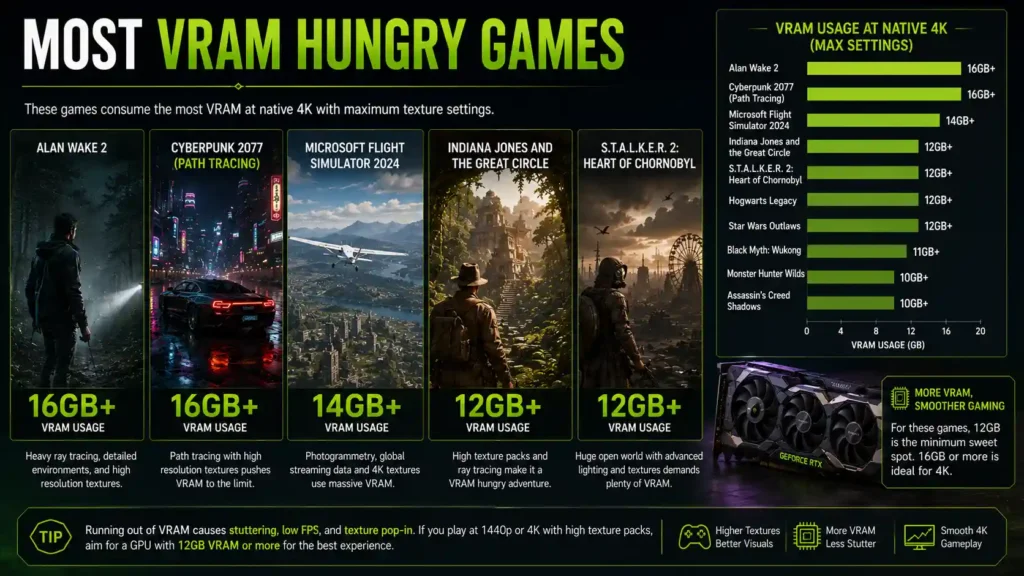
VRAM shortfalls cause stutter and texture pop-in long before your GPU’s compute power becomes the limiting factor. Here’s how the pack breaks down.
Games requiring 8GB
- Kingdom Come: Deliverance II (1080p-1440p)
- Crimson Desert (1080p, moderate settings)
- Resident Evil Requiem (1080p-1440p)
- S.T.A.L.K.E.R. 2 (1080p, no ray tracing)
Games requiring 12GB
- Alan Wake 2 (1440p, ray tracing on)
- Black Myth: Wukong (1440p with ray tracing)
- Avatar: Frontiers of Pandora (1440p-4K)
- The Last of Us Part I (4K, high textures)
Games requiring 16GB+
- Monster Hunter Wilds (high-resolution texture pack)
- Indiana Jones and the Great Circle (4K “Supreme” textures)
- Black Myth: Wukong (4K with full ray tracing)
- Modded Skyrim (heavy texture and ENB configurations)
Which Graphics Cards Can Run These Games?

RTX 4060
Best suited for 1080p at medium-to-high settings across most of this list. Ray tracing and 4K texture packs will force you toward DLSS Performance mode or lower quality tiers on the heaviest titles like Monster Hunter Wilds and Indiana Jones.
RTX 4070 Super
A genuine 1440p workhorse. It handles Black Myth: Wukong, Kingdom Come: Deliverance II, and Resident Evil Requiem well at high settings, though native 4K with ray tracing still asks a lot of it.
RTX 4080 Super
The realistic entry point for native 4K across most of this list, and the card most reviewers use as the baseline for “ray tracing without heavy upscaling.”
RTX 4090
The only card on this list capable of running Cyberpunk 2077’s path tracing anywhere near 4K natively without frame generation, and it still needs DLSS to hit consistently smooth frame rates.
RX 7800 XT
AMD’s strongest value pick for 1440p, though it lacks the ray tracing performance of Nvidia’s equivalent tier — expect to disable or lower ray tracing settings on titles like Avatar: Frontiers of Pandora and Black Myth: Wukong to keep frame rates comfortable.
RX 7900 XTX
Competes well with the RTX 4080 in rasterized 4K performance and offers generous 24GB of VRAM, making it a strong pick for VRAM-hungry titles like Monster Hunter Wilds, even where its ray tracing performance trails Nvidia’s cards.
Best Graphics Settings for Maximum FPS
DLSS
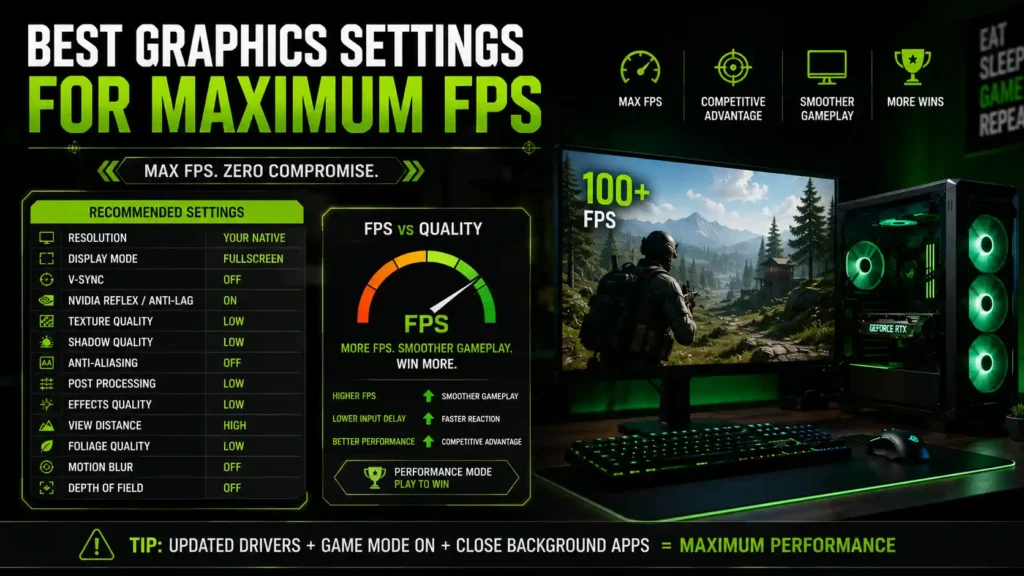
Nvidia’s upscaler is the single biggest performance lever across nearly every game here. Quality mode is close to imperceptible at 1440p and 4K; Performance and Ultra Performance modes trade visible sharpness for substantial frame rate gains.
FSR
AMD’s open-standard upscaler works across Nvidia, AMD, and Intel GPUs, though older FSR versions show more visible shimmering than DLSS at equivalent settings.
XeSS
Intel’s upscaler runs best on Intel Arc hardware but includes a cross-vendor mode for other GPUs, useful as a fallback in games that don’t support FSR.
Frame Generation
Doubles or, with newer multi-frame generation tech, quadruples your displayed frame rate by inserting AI-generated frames. It doesn’t reduce input latency, so it works best when your base frame rate is already 50-60 FPS before generation kicks in.
Upscaling
Rendering at a lower internal resolution and reconstructing detail is what makes 4K playable on mid-range hardware in nearly every game on this list. Quality mode is the safest starting point.
Texture Quality
The setting most directly tied to VRAM usage rather than raw GPU compute. Dropping from Ultra to High textures often costs little visual fidelity while freeing several gigabytes of VRAM.
Ray Tracing
The most expensive single setting across this entire list. Enabling reflections or global illumination can cost anywhere from 10% to over 50% of your frame rate depending on the implementation.
GPU Benchmarks at Different Resolutions
1080p
Even demanding titles like Indiana Jones and the Great Circle become playable on RTX 4060-class hardware at 1080p, provided ray tracing stays at its lowest tier.
1440p
The resolution where the real differences between this list’s games show up. RTX 4070 Super and RX 7800 XT-class cards separate comfortably from budget options here.
4K
Ray tracing at native 4K remains genuinely difficult even on an RTX 4090 in titles like Cyberpunk 2077 and Avatar: Frontiers of Pandora, making upscaling close to mandatory.
Ultrawide
Ultrawide resolutions (3440×1440 and similar) sit between 1440p and 4K in GPU load, and VRAM-hungry titles like Monster Hunter Wilds will push memory usage closer to their 4K figures than their standard 1440p figures.
VR Gaming
VR headsets render two views simultaneously at high refresh rates, effectively multiplying GPU load beyond flat-screen 4K in demanding titles, which is why VR-capable GPUs skew toward the RTX 4080 tier and above even for moderately complex scenes.
Common Reasons These Games Perform Poorly
Insufficient VRAM
The single most common cause of stutter in this list’s games. Symptoms include texture pop-in, sudden frame time spikes, and occasional crashes to desktop, even when your GPU’s raw compute power seems adequate.
CPU Bottleneck
Open-world titles like Monster Hunter Wilds and S.T.A.L.K.E.R. 2 can bottleneck on the CPU during heavy AI or streaming moments, showing low GPU utilization alongside disappointing frame rates.
Thermal Throttling
Sustained ray tracing workloads generate more heat than typical rasterized gaming, and inadequate case airflow can cause frame rates to drop gradually over long sessions as your GPU throttles its clock speed.
Outdated Drivers
New releases frequently ship alongside day-one driver updates from Nvidia and AMD; running an old driver is a common, easily fixed cause of stutter and crashes.
Slow SSD
Titles with aggressive asset streaming, including Monster Hunter Wilds and Avatar: Frontiers of Pandora, can show texture pop-in on traditional hard drives or slower SATA SSDs even when GPU and CPU specs are otherwise sufficient.
Background Processes
Recording software, browser tabs, and overlay applications can eat into both VRAM and CPU headroom, disproportionately affecting already-demanding titles.
How to Improve Performance in GPU Intensive Games
- Update Drivers — install the latest Game Ready or Adrenalin driver before launching any new release on this list.
- Enable DLSS/FSR/XeSS — Quality mode is close to free performance with minimal visual cost in nearly every title here.
- Lower Ray Tracing — dropping from the highest ray tracing tier to Medium often recovers 30-50% of your frame rate for a comparatively small visual difference.
- Reduce Shadow Quality — one of the cheapest settings to lower for a meaningful frame rate gain across most of these games.
- Optimize Windows — closing background apps, disabling unnecessary startup programs, and keeping your OS updated reduces stutter in CPU-sensitive titles.
- Enable Resizable BAR — a free performance gain on supported motherboard and GPU combinations, particularly helpful in Avatar: Frontiers of Pandora and Monster Hunter Wilds.
Frequently Asked Questions
What is the most GPU intensive game in 2026?
Cyberpunk 2077 with path tracing enabled remains the toughest single test for a modern GPU, given that even an RTX 4090 struggles to clear 20 FPS at native 4K without upscaling or frame generation.
Which game uses the most VRAM?
Monster Hunter Wilds is the current VRAM record-holder on this list, with usage approaching 20GB at its highest quality settings regardless of resolution.
Is Cyberpunk 2077 still the hardest game to run?
For path tracing specifically, yes. For general rasterized performance, several newer titles including Indiana Jones and the Great Circle and Avatar: Frontiers of Pandora now demand comparable or greater hardware at native 4K.
Are VR games more GPU intensive?
Generally yes, because VR headsets render two separate views at high refresh rates, which multiplies GPU workload well beyond an equivalent flat-screen resolution.
Can an RTX 4060 run these games?
Yes, at 1080p with settings adjusted and upscaling enabled. Native 1440p or 4K with ray tracing maxed out will require stepping up to at least an RTX 4070 Super or better for most titles here.
Which game requires RTX 4090?
Cyberpunk 2077 with path tracing at native 4K is the clearest case where nothing short of an RTX 4090 delivers reasonable frame rates, and even then, upscaling is doing a lot of the heavy lifting.
What resolution puts the most load on the GPU?
Native 4K, by a wide margin, since it renders roughly four times the pixel count of 1080p with a proportional hit to frame rate in nearly every title on this list.
Does ray tracing increase GPU usage?
Significantly. Depending on implementation, ray tracing can cost anywhere from a modest 7-8% frame rate hit, as seen in Monster Hunter Wilds’ reflections, to over 50% in path-traced titles like Cyberpunk 2077.
How much VRAM is enough for modern AAA games?
8GB is now a practical minimum for 1080p, 12GB is comfortable for 1440p, and 16GB is the safer target for 4K or ray tracing-heavy configurations, based on current testing across this list’s most demanding titles.
What settings impact GPU performance the most?
Ray tracing quality, native resolution, and texture quality (through VRAM pressure) account for the large majority of GPU performance swings across every game covered here.
Final Verdict
If you’re building or upgrading a PC specifically to handle this list, an RTX 4080 Super or RX 7900 XTX paired with 32GB of system RAM covers nearly everything here at 1440p with ray tracing, and handles 4K comfortably once you lean on DLSS or FSR Quality mode.
If path tracing in Cyberpunk 2077 or 4K native ray tracing in Avatar: Frontiers of Pandora is your benchmark, nothing short of an RTX 4090 gets you there without heavy upscaling.
And if your budget tops out at an RTX 4060 or RX 7800 XT, you’re not locked out of any of these games — you’re just going to become very familiar with your DLSS or FSR settings menu, and that’s a perfectly reasonable way to play in 2026.